
Alumina is an integrated CAD/CAM, physics simulation, and motion control solution written entirely in Rust. It is intended to control laser and plasma cutters, 3D printers, CNC routers and mills, and lathes.
Try the Alumina Interface Web Demo
Alumina Firmware and Interface get linked together at compile time and fit in the onboard flash of a single microcontroller, reducing design complexity, part count, and cost.
- Alumina Firmware
- targets the xtensa and risc-v esp32 microcontrollers
- sets up a Wifi AP called "Alumina"
- serves the Alumina UI via HTTP
- responds to commands from the Alumina UI via HTTP
- performs motion planning and step generation
- (planned) port to embassy and FoA and smol
- (planned) port to other embassy hardware targets
- Alumina Interface
- targets WebAssembly
- draws geometry using WebGL and egui
- works in any browser, desktop or mobile
- CAD using csgrs and egui_node_graph2
- calculate and display 2D slices of 3D models
- Communicates with Alumina Firmware to display diagnostic log, graph, and photo of the controller
- Fits in < 4Mb microcontroller flash, including firmware
- (planned) multiple controllers in sync
- (planned) use wgmath to move most CAD and geometry and toolpath calculation to the GPU



/						GET index.html
/alumina-ui.js			GET alumina-ui.js
/alumina-ui.html		GET alumina-ui.html.gz
/alumina-ui_bg.wasm		GET alumina-ui_bg.wasm.br
/favicon.ico			GET favaicon.gif
/time					GET
/files					POST
/queue					GET, POST
/board					GET json: {{"name":"{}","image_mime":"{}","image_url":"/board/image"}}
/board/image			GET PNG formatted board image
cargo install espup
espup install
export IDF_PATH="~/.espressif/esp-idf/v5.4.1/"

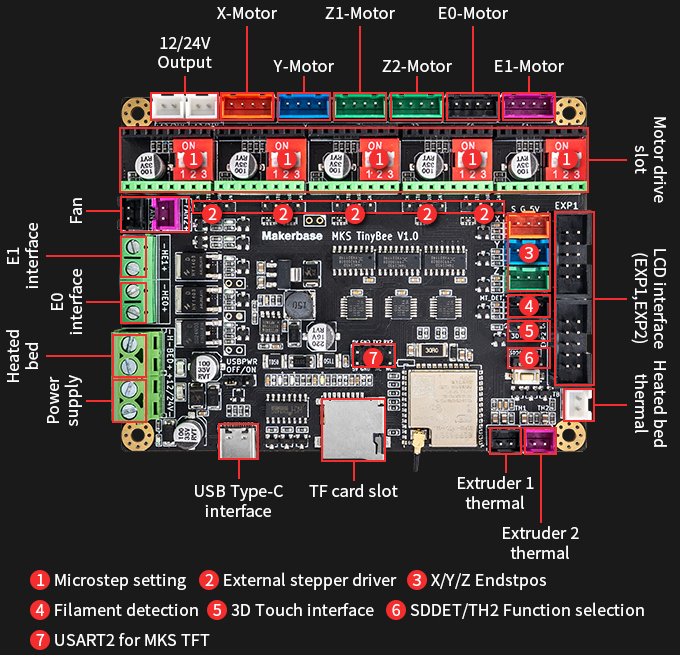
cargo run --release --features="device_mks_tinybee"
to flash devices which make use of a ch340 USB serial adapter you must modify ~/.config/espflash.toml like so:
[connection]
# esp32-c3
#serial = "/dev/ttyACM0"
# ch340 + esp32-c3
serial = "/dev/ttyUSB0"

# esp32-c3
#[[usb_device]]
#vid = "303a"
#pid = "1001"

# ch340 + esp32-c3
[[usb_device]]
vid="1a86"
pid="7523"- BLE support
- flesh out wifi scan / connect and nvs support
- get motion control working
- klipper style multi-mcu support
- get endstops and homing working
- implement sd card support
- data logging (from IMU, temp/humid, received commands) to SD available space
- add internet cloud to diagram animation
- crunch board graphics and link at compile time for diagnostics tab
- bus pirate features
- support http://wiki.fluidnc.com/en/hardware/existing_hardware
- FoC Servo support
- MPPT
- Active Rectification support
- PID / bang-bang heater control
- rename board to device
- rename to Alumina Interface / Alumina Device
- consider implementing commands similar to https://github.com/simplefoc/Arduino-FOC/blob/master/src/communication/commands.h