Enable editing to mime renderer in JupyterLab#1353
Merged
Conversation


Member
Author
|
Round trip arrow save/load
|

texodus
reviewed
Mar 24, 2021

Member
|
Also - this is a really cool feature! |
 timkpaine
force-pushed
the
mimerender_edit
branch
from
timkpaine
force-pushed
the
mimerender_edit
branch
from
e07d6da to
9e1b052
Compare
timkpaine
force-pushed
the
mimerender_edit
branch
from
5bb5885 to
032c843
Compare

Member
Author
|
@texodus redid this on top of your fixes and its working fine, ready for review |
 texodus
changed the title
texodus
changed the title
texodus
approved these changes
Apr 14, 2021
Member
 texodus
left a comment
texodus
left a comment
texodus
left a comment
There was a problem hiding this comment.
Thanks for the PR! Looks good -
- Does the arrow output work? On first sight it looks suspect, I will test this.
- It may be prohibitively expensive to save on every cell edit, the mime renderer may benefit form a small control panel with "update/reset" and "save/submit" buttons?
| } else if (this._type === "arrow") { | ||
| view.to_arrow().then((result: ArrayBuffer) => { | ||
| const resultAsB64 = btoa(new Uint8Array(result).reduce((acc, i) => (acc += String.fromCharCode.apply(null, [i])), "")); | ||
| this.context.model.fromString(resultAsB64); |
Member
There was a problem hiding this comment.
What does this do - this creates an arrow and not a base64 encoded string in a text file?
Member
Author
There was a problem hiding this comment.
Yep the key is in a different code block where we tell jupyter to open arrow files as binary which means they're exposed in the model as b64 encoded strings and the underlying conversion to/from binary is managed for us https://github.com/finos/perspective/blob/master/packages/perspective-jupyterlab/src/ts/renderer.ts#L168

 texodus
force-pushed
the
mimerender_edit
branch
from
texodus
force-pushed
the
mimerender_edit
branch
from
07caff0 to
eb0b955
Compare
This file contains hidden or bidirectional Unicode text that may be interpreted or compiled differently than what appears below. To review, open the file in an editor that reveals hidden Unicode characters.
Learn more about bidirectional Unicode characters
Sign up for free
to join this conversation on GitHub.
Already have an account?
Sign in to comment
2 participants


Add this suggestion to a batch that can be applied as a single commit.This suggestion is invalid because no changes were made to the code.Suggestions cannot be applied while the pull request is closed.Suggestions cannot be applied while viewing a subset of changes.Only one suggestion per line can be applied in a batch.Add this suggestion to a batch that can be applied as a single commit.Applying suggestions on deleted lines is not supported.You must change the existing code in this line in order to create a valid suggestion.Outdated suggestions cannot be applied.This suggestion has been applied or marked resolved.Suggestions cannot be applied from pending reviews.Suggestions cannot be applied on multi-line comments.Suggestions cannot be applied while the pull request is queued to merge.Suggestion cannot be applied right now. Please check back later.
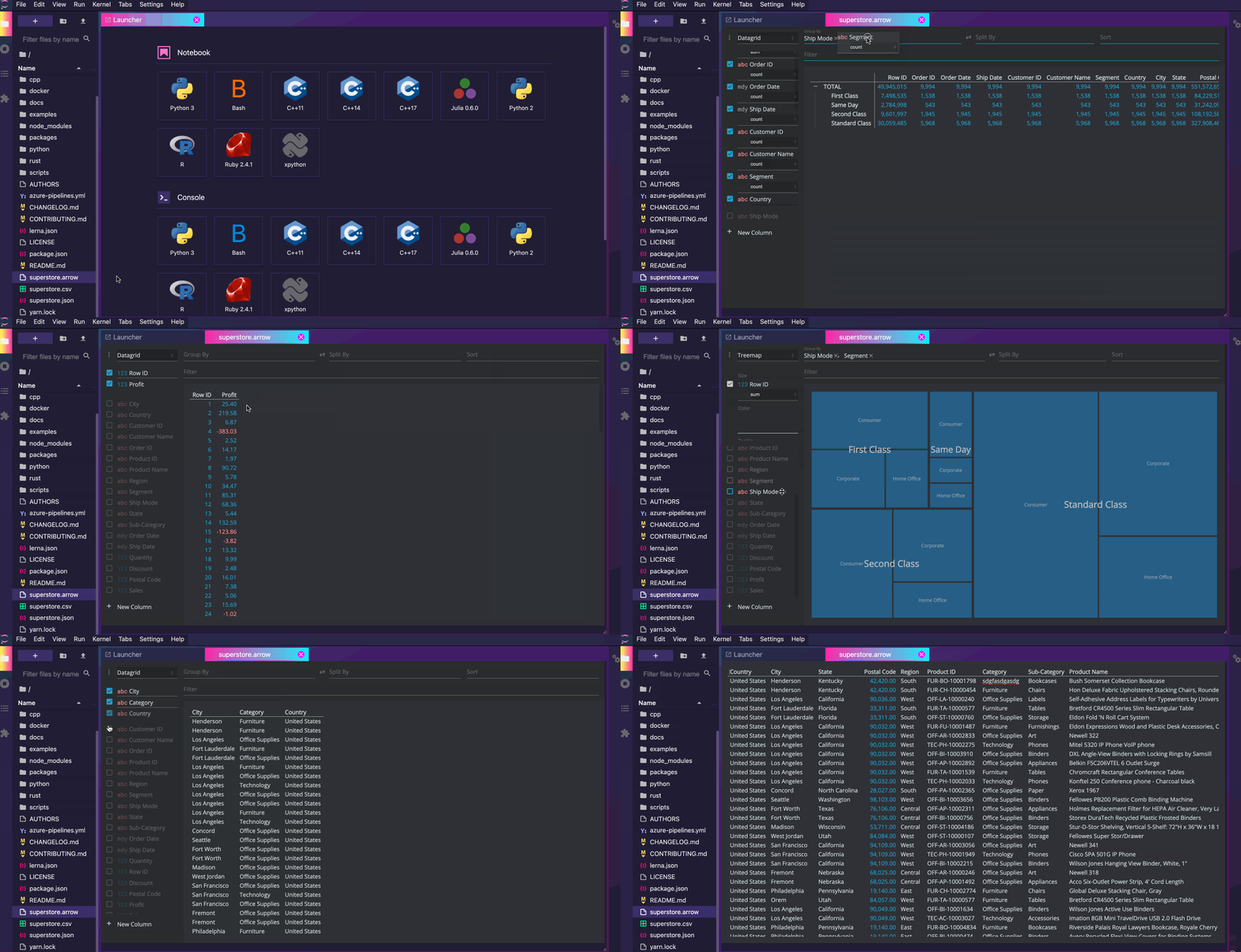
This is a simple modification that turns on editing for our JupyterLab mime renderer plugin (the thing that lets you right click on a
csv,json, orarrowand visualize in perspective). As a result, we now have a pivotable, sortable, filterable, editable csv/json/arrow viewer.