


A plugin for Jellyfin that extracts metadata tags from audio files (ID3v2, Vorbis comments, etc.) and adds them as Jellyfin tags for better organization and discovery.
This plugin automatically processes your music library to extract embedded tags and makes them available for filtering, and organizing your music collection.
Requires Jellyfin version 10.10.0 or newer. New functionality is only developed for Jellyfin version 10.11.0 and newer.
- 🎵 Multi-Format Support - Extracts tags from ID3v2, Vorbis comments (FLAC/OGG), and other audio metadata formats
- 🏷️ Flexible Tag Extraction - Configure which specific tags to extract and add to Jellyfin
- ✂️ Delimiter Splitting - Automatically split multi-value tags into separate Jellyfin tags for better filtering
- 📚 Parent Propagation - Automatically apply tags from songs to their parent albums and artists
- 🧹 Tag Cleanup - Remove unwanted tags from your Jellyfin library
- ⚙️ Configurable Options - Choose whether to overwrite existing tags or preserve them
- 🔄 Automatic Processing - Scheduled task automatically processes new and updated audio files
- 🚀 Manual Processing - Trigger tag extraction immediately for all audio files
- 🎨 Modern Web Interface - Easy-to-use configuration page integrated into Jellyfin's plugin settings
MusicTags features a modern web-based configuration interface through the plugin settings page! Configure tag extraction settings without any manual file editing.
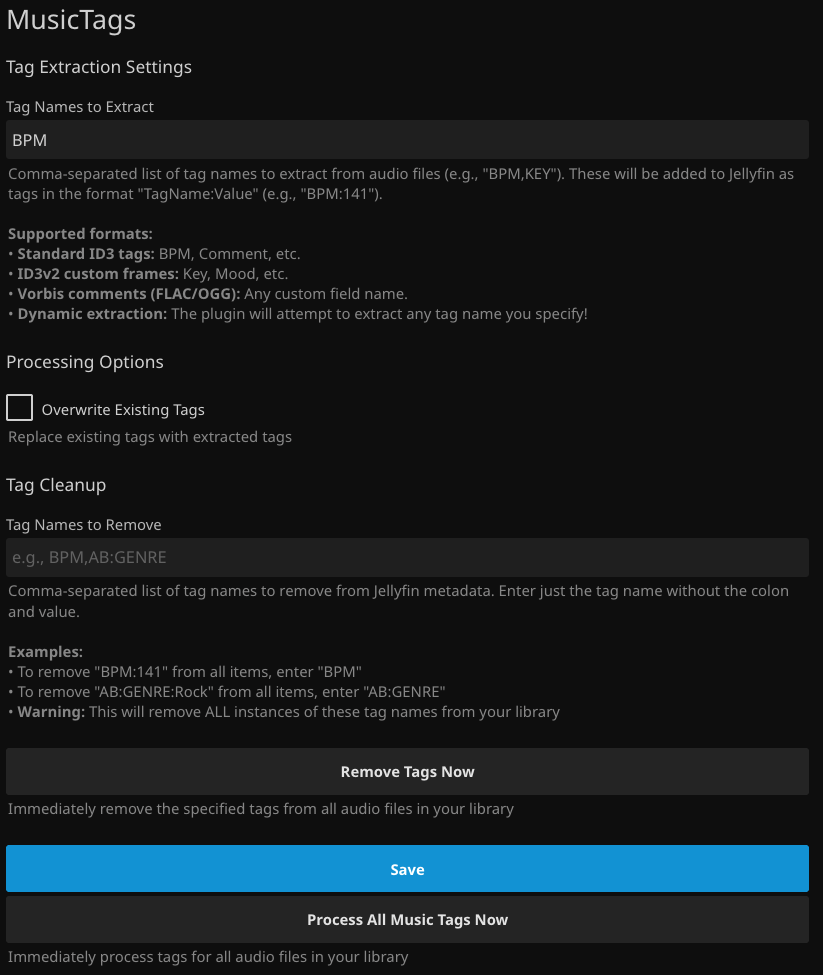
The configuration page allows you to:
-
Tag Names to Extract: Specify which tags to extract from your audio files
- Comma-separated list of tag names (e.g., "GENRE,BPM,MOOD,KEY")
- Supports standard ID3 tags (GENRE, MOOD), custom frames, and Vorbis comments
- Also supports AcousticBrainz tags if you use MusicBrainz Picard (e.g., "AB:GENRE,AB:MOOD")
- Tags are added to Jellyfin in the format "TagName:Value" (e.g., "GENRE:Rock", "BPM:141")
-
Tag Value Delimiters: Split multi-value tags into separate tags
- Enter delimiter characters (e.g.,
/|;\for slash, pipe, semicolon, and backslash) - Each character in the string is treated as a separate single-character delimiter
- Automatically splits tag values containing these delimiters into multiple tags
- Perfect for multi-genre tracks, parental controls, and instant mix functionality
- Leave empty to disable splitting
- Enter delimiter characters (e.g.,
-
Tag Names to Remove: Remove unwanted tags from your Jellyfin library
- Comma-separated list of tag names to remove (e.g., "BPM,KEY")
- Removes ALL instances of these tag names from your library
-
Processing Options: Control how tags are processed
- Overwrite Existing Tags: Replace existing Jellyfin tags with extracted audio file tags
- Propagate Tags to Parent Albums and Artists: Automatically apply tags from songs to their parent album and artist items. Note: This adds tags to parents; it does not remove existing parent tags. To remove tags from parents, use Tag Cleanup with "Also remove from albums and artists" enabled.
- Manual Processing: Trigger immediate processing of all audio files
The plugin supports extraction from multiple audio metadata formats:
- Artist, Album, Genre, Year, Composer, BPM, Publisher, Copyright, Comment
- Any standard ID3v1 or ID3v2 tag
- Key, Mood, Language, ContentGroup
- Any 4-character frame ID (e.g., TXXX frames)
GENRE,MOOD, or any custom field name- AcousticBrainz tags:
AB:GENRE,AB:MOOD(commonly used with MusicBrainz Picard) - Note: The
AB:prefix refers to AcousticBrainz metadata. You can use eitherGENREorAB:GENREdepending on how your files are tagged.
- The plugin will attempt to extract any tag name you specify!
- Works with most audio formats that support metadata
The plugin supports extraction of custom tags from all major audio formats:
All these formats support extraction of any custom tag you define:
- MP3 - Standard ID3v2 frames and custom TXXX frames
- WAV - Standard ID3v2 frames and custom TXXX frames (when ID3v2 tags are present)
- FLAC - Vorbis comments (any custom field name)
- OGG - Vorbis comments (any custom field name)
- OPUS - Vorbis comments (any custom field name)
- WMA - ASF tags (any custom field name)
- M4A/MP4/AAC - Apple/iTunes freeform tags (any custom field name)
Example: You can extract FILETYPE, MOOD, LANGUAGE, KEY, BPM, or any other custom tag you've added using tools like MP3Tag or MusicBrainz Picard.
All supported formats can also extract these standard metadata fields:
- Artist, Album, Genre, Year, Title, Composer, BPM, Publisher, Copyright, Comment
Add this repository URL to your Jellyfin plugin catalog:
https://raw.githubusercontent.com/jyourstone/jellyfin-plugin-manifest/master/manifest.json
Download the latest release from the Releases page and extract it to your Jellyfin plugins directory.
Configure the plugin to extract genre and mood information from your audio files:
- Tag Names to Extract:
GENRE,MOOD(for standard tags) orAB:GENRE,AB:MOOD(for AcousticBrainz tags) - This will add tags like "GENRE:Rock", "GENRE:Electronic", "MOOD:energetic" to your music
- Note: Use whichever tag names match your file metadata (check with a tag editor like MP3Tag or MusicBrainz Picard)
If your audio files contain multiple genres separated by delimiters:
- Tag Names to Extract:
GENRE - Tag Value Delimiters:
/|\(forward slash, pipe, and backslash as individual delimiters) - A file with
GENRE=Progressive Rock\Psychedelic Rockwill create two separate tags:GENRE:Progressive RockGENRE:Psychedelic Rock
- This enables Jellyfin's instant mix to pull from either genre catalog
- Perfect for parental control filtering by individual genres
For DJ mixing or music production analysis:
- Tag Names to Extract:
BPM,KEY - This will add tags like "BPM:128", "KEY:Am" to your tracks
- Great for creating smart playlists based on tempo or harmonic mixing
For parental control filtering to work at album/artist level:
- Tag Names to Extract:
GENRE - Propagate Tags to Parent Albums and Artists: ✅ Enabled
- After processing, songs' genre tags will be applied to their albums and artists
- You can then use Jellyfin's parental controls to block specific genres for users
- Example: If all songs in an album have
GENRE:Rock, the album will also getGENRE:Rock. If you block Rock for a user, they won't see the album at all. - Note: Propagation adds tags to parents but doesn't remove them. To clean up parent tags after removing song tags, run Tag Cleanup with "Also remove from albums and artists" enabled.
Remove unwanted tags from your library:
- Tag Names to Remove:
BPM - This will remove all instances of these tags from your Jellyfin music library
MusicTags works exceptionally well with the SmartPlaylist Plugin! Once you've extracted audio tags with MusicTags, you can use SmartPlaylist to create dynamic playlists based on those custom tags.
- High-Energy Workout Mix: Create a playlist with
BPMtags between 130-150 (filter by tags and use this regex:\bBPM:(13[0-9]|14[0-9]|150)\b) - Chill Vibes: Filter by
MOODorAB:MOODtags like "chill", "relaxing", or "ambient" - Key-Based Playlists: Group songs by musical key using extracted
KEYtags - Complex Combinations: Combine multiple audio tags (e.g., "BPM:140-160" AND "MOOD:energetic")
This powerful combination allows you to leverage the rich metadata embedded in your audio files to create sophisticated, automatically-updating playlists that reflect the actual musical characteristics of your music!
MusicTags automatically processes your audio files when the "Process Music Tags" scheduled task runs. You can also manually trigger processing from the plugin configuration page.
For local development, see the dev folder
- Extract:
BPM - Result: Adds "BPM:141" tags to tracks with tempo information
- Extract:
GENRE(standard tag) orAB:GENRE(AcousticBrainz tag) - Result: Adds "GENRE:Rock" or "AB:GENRE:Rock" tags depending on which tag exists in your files
- Note: Use
GENREfor standard ID3/Vorbis tags, orAB:GENREif you use MusicBrainz Picard with AcousticBrainz plugins
- Extract:
MOOD(standard tag) orAB:MOOD(AcousticBrainz tag) - Result: Adds "MOOD:energetic" or "AB:MOOD:energetic" tags for mood classification
- Note: Both work identically; choose based on how your files are tagged
- Extract:
KEY - Result: Adds "KEY:C" tags for musical key information
See the Audio Format Support section above for detailed information about which formats support custom tags vs. standard tags only.
- Tag extraction is performed as a background task to avoid impacting Jellyfin performance
- Large libraries may take some time to process
- Processing can be scheduled during off-peak hours
The vast majority of this plugin, was developed by an AI assistant. While I do have some basic experience with C# from a long time ago, I'm essentially the project manager, guiding the AI, fixing its occasional goofs, and trying to keep it from becoming self-aware. Use at your own risk!
