


This Data Warehouse was created as a means to access the Sparkify data for analytical purposes.
The project has been created with the following structure:
├── README.md
├── check_s3.py
├── create_tables.py
├── dwh_template.cfg
├── etl.py
├── iac_redshift.py
├── requirements.txt
└── sql_queries.py- check_s3.py: Python utility to download sample files.
- create_tables.py: Python script that creates tables in the AWS Redshift Cluster.
- dwh_template.cfg: Template for the configuration file. Fill in the missing information and rename the file to dwh.cfg
- etl.py: Python script that loads the data from S3 into the Cluster.
- iac_redshift.py: Python utility that creates and deletes an AWS Redshift Cluster (IaC).
- requirements.txt: requirements for python env.
- sql_queries.py: Sql queries to create the Data Warehouse.
Create a virtual env and install the necessary packages
python -m venv venv
source venv/bin/activate
pip install -r requirements.txtCreate the cluster
python iac_redshift.py --createAfter a while check if the cluster is available by running the status command
python iac_redshift.py --statusThis will return a table and if the status is available it will also return the cluster address and the IAM role. Please fill in these values into the configuration file. CLUSTER-HOST and IAM_ROLE-NAME respectively.
The cluster can be deleted running to avoid innecessary costs while developing:
python iac_redshift.py --delete
⚠️ This will delete the cluster and all the information with it. After this point all data will be lost and both the creation and uploading scripts will be needed to recreate the cluster.
The file sql_queries.py contains the SQL instructions to create the tables. Running the create_tables.py file will produce the following tables
- stagingEvents : Staging table that maps the S3 Log data into the cluster.
- stagingSongs: Staging table that maps the S3 Song data into the cluster.
And the Schema for OLAP.
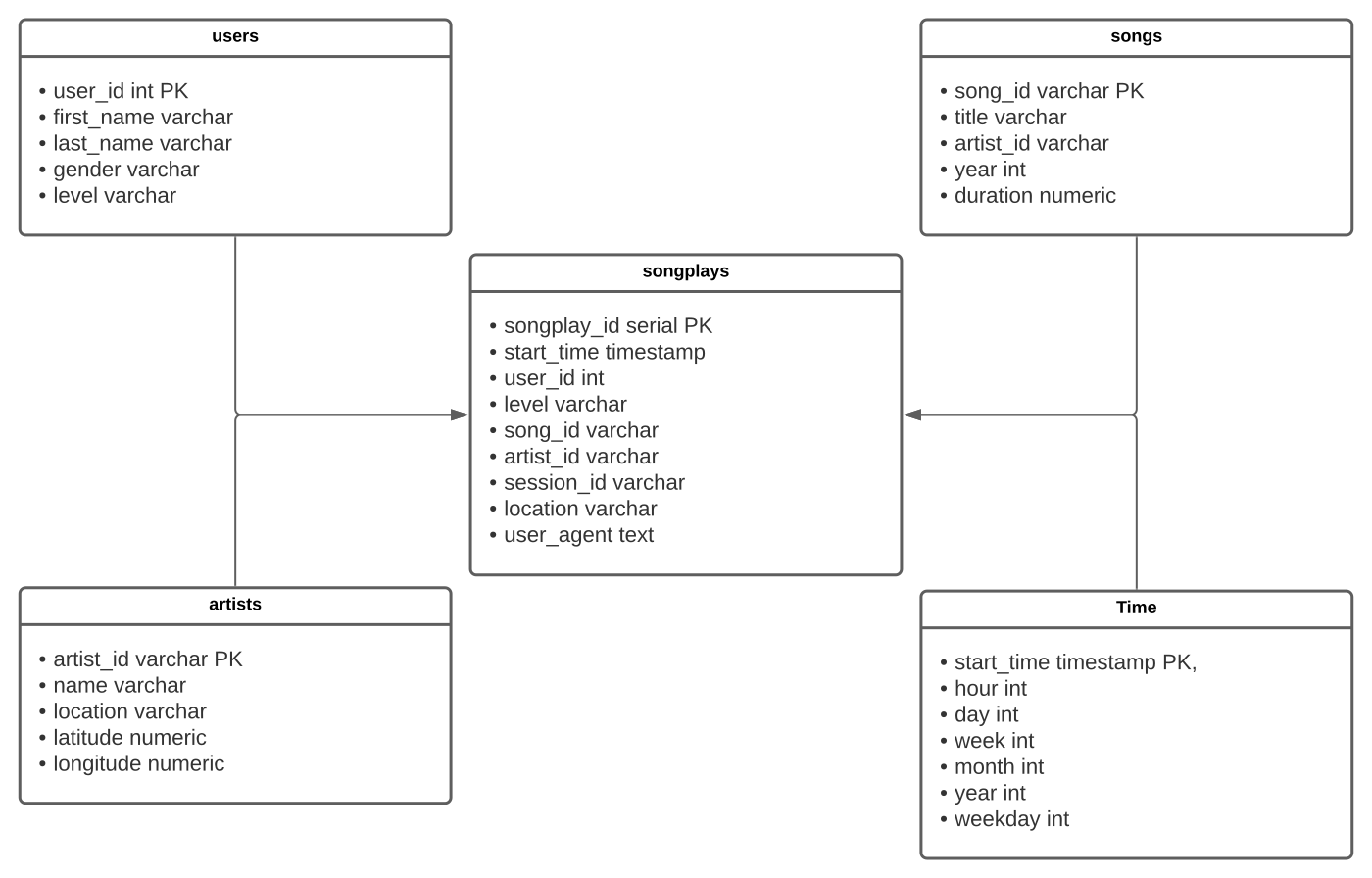
- songplays
- users
- songs
- artists
- time
To create the tables run the following command.
python create_tables.py
⚠️ This will drop the tables everytime before creating new ones.
A star schema was implemented in order to make queries about the usage of the streaming app as simple as possible.
To upload the data to the staging tables and the star schema run the following command.
python etl.py
With this implementation it is possible to answer simple questions like
- Who are the most loyal users?
SELECT sp.user_id, u.first_name, u.last_name, COUNT(sp.user_id)
FROM (songplays sp JOIN users u ON u.user_id = sp.user_id)
GROUP BY sp.user_id, u.first_name, u.last_name
ORDER BY COUNT(sp.user_id) DESC;- What time of day are certains songs listen to the most and by which kind of user?
SELECT u.level, t.hour, s.title, COUNT(sp.session_id) AS sessions
FROM songplays sp
JOIN users u ON (u.user_id = sp.user_id)
JOIN time t ON (t.start_time = sp.start_time)
JOIN songs s ON (s.song_id = sp.song_id)
GROUP BY (u.level, t.hour, s.title)
ORDER BY sessions DESC
LIMIT  10;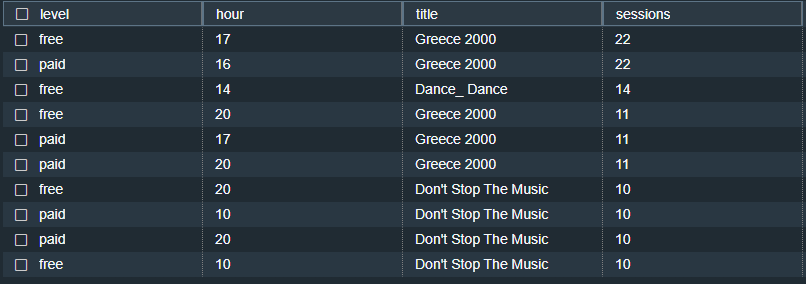
- Or create OLAP Cubes for further analysis.
SELECT  NULL as hour, NULL as title, COUNT(sp.session_id) AS sessions
FROM songplays sp
   UNION all
SELECT NULL, s.title, COUNT(sp.session_id) AS sessions
FROM songplays sp
JOIN songs s ON (s.song_id = sp.song_id)
GROUP BY  s.title
    UNION all
SELECT t.hour , NULL, COUNT(sp.session_id) AS sessions
FROM songplays sp
JOIN time t ON (t.start_time = sp.start_time)
GROUP BY t.hour
    UNION all
SELECT t.hour, s.title, COUNT(sp.session_id) AS sessions
FROM songplays sp
JOIN time t ON (t.start_time = sp.start_time)
JOIN songs s ON (s.song_id = sp.song_id)
GROUP BY (t.hour, s.title)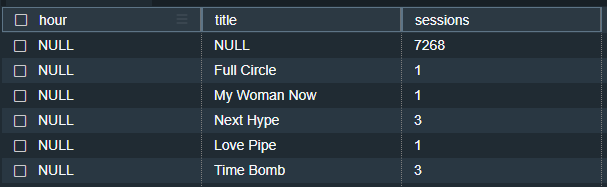
The repo needs a dwh.cfg config file that contains the secrets and enviroment variables needed for the project to run. A template file is provided dwh_template.cfg. Please rename it after filling in the required information.