
A native Kubernetes desktop client that installs nothing in your cluster.


macOS · brew tap sametkum/klustr && brew install klustr
Arch / CachyOS / Manjaro · paru -S klustr-bin
Debian / Ubuntu · sudo apt install ./klustr_*_amd64.deb (download first)
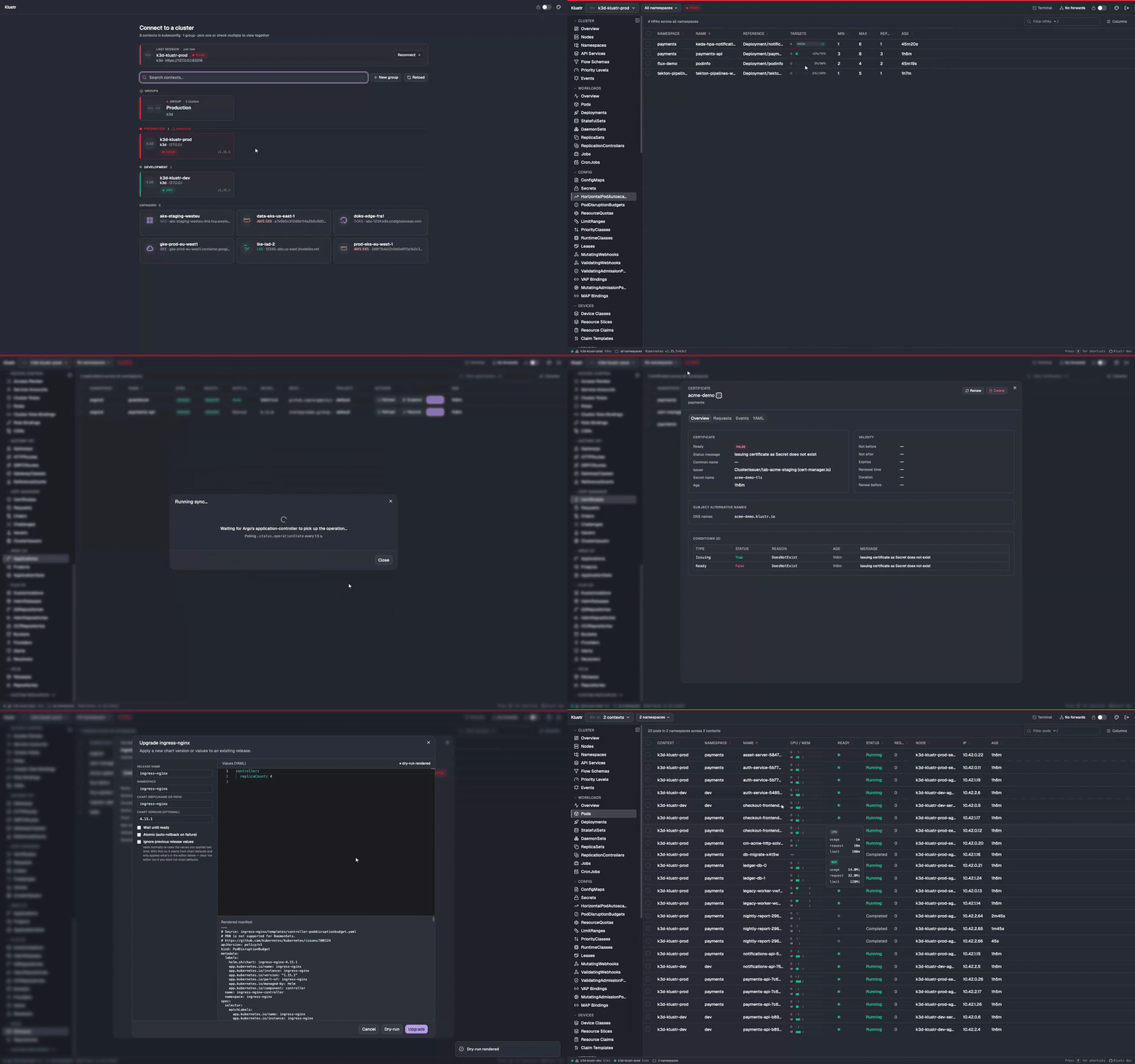
▶ Watch the full-quality video
Klustr is a cross-platform Kubernetes desktop client built with Wails (Go + native webview) and React. It uses your existing ~/.kube/config and speaks the standard Kubernetes API directly — nothing is deployed in the cluster. Drop the binary in, point at any context, and you're looking at a live view of everything you have permission to see — built-in resources, full RBAC with a subject → effective-permissions review, Custom Resources (CRDs), Helm releases, Argo CD Applications, Flux CD reconcilers, Gateway API routes, and cert-manager certificates included. No extra logins, no argocd, flux or helm CLI required — only your kubeconfig.
- 🔌 Pure client. No CRDs, no in-cluster components — works with whatever your kubeconfig already grants.
- 🔁 Live everywhere.
client-goinformers, never polled. - 🌐 Multi-context aggregation. View 2+ clusters in one table, per-context status pings with latency in the status bar.
- 👥 Context groups & tags. Named multi-context groups; color tags on the top bar so you always know which environment you're touching.
- 📋 Every built-in resource. Workloads, networking, storage, config, admission, autoscaling, and the full RBAC set under a dedicated Access Control sidebar group.
- 🔎 Access Review. Subject → effective-permissions GVR × verb matrix with the binding → role chain behind every ✓, wildcards and
cluster-adminflagged. Live, no--asimpersonation, no extra API traffic. - 🧩 Custom Resources (CRDs). Auto-discovered on connect, grouped by API group, watch-backed.
- ⎈ Helm. First-class Helm v3: install / upgrade / rollback / uninstall with a dry-run preview before any change, plus repo management and chart search.
- 🚢 Argo CD. Sync, Refresh, Rollback and cascade-aware Delete through the Kubernetes API — no
argocd-server, noargocdCLI, no Argo login. - 🚀 Flux CD. Kustomization · HelmRelease · GitRepository · HelmRepository · OCIRepository · Bucket · Provider · Alert · Receiver — each with Reconcile + Suspend/Resume buttons that hit the standard Flux annotations, no
fluxCLI. - 🌉 Gateway API. Typed informers; listener table, per-rule match → backend → weight matrix and
RouteParentStatusso a misrouted parent orRefNotPermittedbackend is one click away. Vendor-neutral. - 🔐 cert-manager. Certificates, Issuers / ClusterIssuers, and the full issuance chain — CertificateRequest → Order → Challenge — with ready/expiry status and a drill-down across the chain. One-click Renew, no
cmctlCLI. - 📜 Logs. Stern-style multi-pod streaming with per-pod ANSI colors, follow, save and regex.
- 🖥️ In-app exec. SPDY shell into any container.
- 🐚 Node shell. Root shell on any node via a temporary privileged
nsenterpod that's removed when the session ends — no SSH, nothing pre-installed. - 🚧 Cordon & drain. One-click cordon/uncordon and a live-progress drain that evicts through the Eviction API (PDB-aware, skips DaemonSet & mirror pods).
- 🔧 YAML edit. Monaco editor with a server-side dry-run diff before apply.
- 🚀 Scale, restart, pause/resume. Replica controls, one-click rolling restart, inline pause/resume, HPA min/max editable inline.
- 📐 In-place pod resize. Change a running container's CPU / memory requests and limits via the
pods/resizesubresource — no pod recreation; shows the live resize status (Deferred / Infeasible). - ⏪ Rollout history & rollback. Side-by-side template diff and one-click revert on Deployments / StatefulSets / DaemonSets.
- 🔄 Port-forwarding. Suggested local ports, persistent header indicator, click-to-open in browser.
- 🗺️ Cluster overviews. CPU / memory / pod donuts, workloads health, recent warnings — single-cluster or aggregated.
- 🧭 Cross-resource navigation. Drill from workload to pod to node and back.
- 🎨 Themes & shortcuts. Command palette (
⌘P), namespace search (⌘N), keyboard cheatsheet (?).
Every shot is captured live from real clusters. Each is rendered in a different theme so the pack doubles as a tour of Klustr's themes — see docs/screenshots/ for the full set including light variants.
 |
 |
Aggregated pods — two clusters in one table, Context column, status pill variety |
Cluster overview — CPU / memory / pod donuts, live warnings feed |
 |
 |
| Node usage — CPU / memory bars and pressure conditions per node | KEDA HPA — autoscaler detail with the cron trigger humanized |
 |
 |
| Helm Upgrade — values editor, Wait / Atomic options, dry-run preview | YAML edit — Monaco editor with a server-side diff before apply |
 |
 |
Argo CD — Sync / Health pills, per-row Sync & Refresh without argocd CLI |
Flux CD — Kustomization conditions, source & applied revision, Reconcile / Suspend |
 |
 |
| cert-manager — certificate readiness, issuer, SANs and the issuance chain | Gateway API — HTTPRoutes with parents, hostnames, accepted pills |
 |
 |
| Pod diagnosis — a card explaining why a pod is unhealthy (CrashLoopBackOff, OOMKilled…) | Aggregated logs — multi-pod stream, per-pod colors, level highlighting |
 |
 |
| Read-only mode — a per-context safety switch that blocks every mutation | Terminal — embedded shell drawer wired to the active context |
The release build is signed with a Developer ID Application certificate and notarized by Apple, so Gatekeeper opens it directly — even offline.
brew tap sametkum/klustr
brew install klustr
After the initial brew tap, future updates are just brew upgrade klustr (or brew upgrade for everything), and brew search klustr / brew info klustr start finding it.
Download the latest darwin-arm64 tarball from the Releases page, then:
tar -xzf klustr-*-darwin-arm64.tar.gz
mv klustr.app /Applications/
open /Applications/klustr.appThe Linux binary links against webkit2gtk-4.1 + gtk-3. Ubuntu 24.04+, Fedora 39+, Arch and most other modern distros ship those runtime libraries by default; on Ubuntu 22.04 install libwebkit2gtk-4.1-0 libgtk-3-0 first.
paru -S klustr-bin
# or
yay -S klustr-bin
The klustr-bin PKGBUILD uses the prebuilt release tarball, so install completes in seconds. paru -Syu keeps it up to date.
The .deb pulls in the runtime dependencies automatically and registers a klustr desktop entry.
VERSION="$(curl -fsSL https://api.github.com/repos/SametKUM/klustr/releases/latest | grep -oP '"tag_name":\s*"\K[^"]+')"
DEB="klustr_${VERSION#v}_amd64.deb"
curl -LO "https://github.com/SametKUM/klustr/releases/download/${VERSION}/${DEB}"
sudo apt install "./${DEB}"Download the latest linux-amd64 tarball from the Releases page, then:
tar -xzf klustr-*-linux-amd64.tar.gz
install -Dm755 klustr ~/.local/bin/klustr
klustr
Windows builds will be attached to releases once they've been validated. Until then, please build from source — see Build from source.
- Klustr reads
~/.kube/configat launch. - On first run, pick a context — or check two or more to view them aggregated as one cluster. Save a recurring selection as a named group for one-click reconnect, and toggle Auto-connect on a card to pin it as the default.
- Browse via the sidebar, click any row for a detail dialog, or
⌘Pto fuzzy-search resources by name. The header's Disconnect button drops you back to the picker at any time.
mise install     # installs Go, Node, Wails CLI pinned in .mise.toml
wails dev        # hot-reload dev session

# or a production build for your host platform
wails build -trimpath -clean| Layer | Choice |
|---|---|
| Desktop | Wails v2 (Go + native webview) |
| Backend | Go 1.26 + client-go (typed clientset + dynamic) + sigs.k8s.io/gateway-api |
| Frontend | React 19 · TypeScript · Vite |
| UI | Tailwind CSS · shadcn/ui |
| State | Zustand (real-time) · TanStack Query (mutations only) |
| Tables | TanStack Table |
| Live data | client-go informers → Wails events → Zustand → React |
Full design notes, conventions and the "add a new resource kind" recipe live in CLAUDE.md.
- Every built-in resource kind (incl. full RBAC: ServiceAccounts, Roles, RoleBindings, ClusterRoles, ClusterRoleBindings)
- Access Review — subject → effective-permission matrix with binding trace, implicit-group expansion (
system:serviceaccounts:*,system:authenticated), wildcard / cluster-admin detection, live across every active context - Logs, exec, port-forwarding
- Node shell (privileged
nsenterpod), cordon/uncordon, PDB-aware drain - YAML edit / apply with diff, scale, restart, deployment pause/resume, HPA inline edit
- In-place pod resize (CPU/memory requests & limits via the
pods/resizesubresource, no recreation) - Rollout history with revision diff and one-click rollback (Deployments / StatefulSets / DaemonSets)
- Cross-resource navigation (related pods, owner/node links, back stack)
- Custom Resource Definitions (CRDs)
- Helm support — release browser, dry-run diff, install / upgrade / rollback / uninstall, repo management
- Gateway API — Gateways, HTTPRoutes, GRPCRoutes, GatewayClasses, ReferenceGrants (typed informers, status pills, listener / rule / RouteParentStatus tables)
- cert-manager — Certificates, Issuers / ClusterIssuers, CertificateRequests, Orders, Challenges (issuance-chain drill-down, ready/expiry status, one-click Renew)
- Multi-cluster aggregated mode + named context groups + per-context health ping
- Notarized macOS build — signed with a Developer ID Application certificate and notarized by Apple
- Linux (amd64) release distribution
- Windows release distribution (after per-platform testing)
Bug reports and focused pull requests are welcome.
- Read
CLAUDE.mdfirst — it's the architecture + conventions contract. - Use Conventional Commits (
feat:,fix:,refactor:…) and prefer small, logically scoped commits. - Before opening a PR, run:
go test klustr/internal/... && go vet ./...
cd frontend && npm test && npm run lint && npm run typecheck
- New user-facing features should include a screenshot or short clip in the PR description.
Full guide: CONTRIBUTING.md. Bug reports go through the bug_report.yml issue template so the version / OS / cluster details we need actually land in the report.
MIT © Samet Kum
Built on the shoulders of: Wails, client-go, React, shadcn/ui, Tailwind CSS, TanStack Table / Query, xterm.js, Monaco Editor, Zustand, Vite, mise.