The height of the "DropDown" list for the combobox control can't be reset default height after called the " comboBox1.Items.Clear();" method #339

Description

OS : RS4 X64+.Net 4.8.03316
VS : Dev16 d16.0stg 16.0 Preview 3 28505.103
More info:
- This issue can reproduce from VS Dev10 to Dev16.
- This issue can't reproduce when adding the following code to Form1.Designer.cs.
comboBox1.Items.AddRange(new object[] { "a", "b", "c", "d", "e" });
comboBox1.Items.Clear();
Steps to reproduce:
- Create a Winforms application.
- Drag a Combobox control to form designer.
- Add the following code to Form1.cs.
private void Form1_Load(object sender, EventArgs e)
       {
comboBox1.Items.AddRange(new object[] { "a", "b", "c", "d", "e" });
          comboBox1.Items.Clear();
}
Actual:
The height of the "DropDown" list for the combobox control can't be reset default height after called the " comboBox1.Items.Clear();" method.
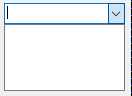
Expected:
The height of the "DropDown" list for the combobox control should be reset default height after called the " comboBox1.Items.Clear();" method.