Fairmotion Action Order Queueing and Perpetual Motion Generator#1578
Merged
JuanTheEngineer merged 41 commits intomainfrom Dec 10, 2021
Merged
Fairmotion Action Order Queueing and Perpetual Motion Generator#1578JuanTheEngineer merged 41 commits intomainfrom
JuanTheEngineer merged 41 commits intomainfrom
Conversation


 facebook-github-bot
added
the
CLA Signed
facebook-github-bot
added
the
CLA Signed

Skylion007
reviewed
Dec 1, 2021
Skylion007
reviewed
Dec 1, 2021
Skylion007
reviewed
Dec 1, 2021
Skylion007
reviewed
Dec 1, 2021
Skylion007
reviewed
Dec 1, 2021
Skylion007
reviewed
Dec 1, 2021

aclegg3
reviewed
Dec 9, 2021
aclegg3
approved these changes
Dec 10, 2021
Contributor
 aclegg3
left a comment
aclegg3
left a comment
aclegg3
left a comment
There was a problem hiding this comment.
Looks good, let's merge it.

This file contains hidden or bidirectional Unicode text that may be interpreted or compiled differently than what appears below. To review, open the file in an editor that reveals hidden Unicode characters.
Learn more about bidirectional Unicode characters
Sign up for free
to join this conversation on GitHub.
Already have an account?
Sign in to comment
4 participants


Add this suggestion to a batch that can be applied as a single commit.This suggestion is invalid because no changes were made to the code.Suggestions cannot be applied while the pull request is closed.Suggestions cannot be applied while viewing a subset of changes.Only one suggestion per line can be applied in a batch.Add this suggestion to a batch that can be applied as a single commit.Applying suggestions on deleted lines is not supported.You must change the existing code in this line in order to create a valid suggestion.Outdated suggestions cannot be applied.This suggestion has been applied or marked resolved.Suggestions cannot be applied from pending reviews.Suggestions cannot be applied on multi-line comments.Suggestions cannot be applied while the pull request is queued to merge.Suggestion cannot be applied right now. Please check back later.
Motivation and Context
So far, our Fairmotion character can follow a given path using a transient motion cycle to advance across the path. However, another important component of this problem is generating motion which solves a task. For example, if our task is to animate a character’s walk from point A to point B, how do we consume existing context-less motion clips to generate a new motion which fits the context of this task?
The second half of Milestone 2 aims at producing perpetual motion and motion queuing complete with transient motion and scenic motion. The Fairmotion character will take from the path follow feature and be able to handle orders of actions to be performed in its environment.
Here is a short demo video:
Perpetual.Motion.Generator.PR.DEMO.mp4
Scenic motions and different transitive motions still in progress
This video is not in realtime, some scenes have been sped up
New Feature Overview
Users and developers can now push tasks in the form of
ActionOrdersto the perpetual motion generator that will be processed (FIFO), staged, and played out by our Fairmotion Character. These action orders simply consist of three components; final location, final facing direction, and a motion data object. When the character need perform a task in a location not of its current, it will gracefully nagivate to the new location and perform its task.Users and developers can configure and fine tune transitive and scenic motions to recieve smooth simulations and mimic human behaviors to the last mannerism. The
Motionsclass holds many tools to do this.Users and developers can continuously queue up action orders to produce perpetual motion for the Fairmotion character. The order processing and staging happens inbetween draw events in chunks of processing to preserve the simulation speed of the character and habitat as well as react in real-time to new orders.
Lastly, a bonus feature has been added to toggle on/off a EGO4D synthetic view while the character lives in the environment. This can be activated with the 'G' key press.
EGO4D.mp4
Features and Processes
Motion Data and Types
The perpetual motion cycle uses a combination of data structures to manage the processing and completion of the tasks that are queued to it. The classes are used to abstract the intermediate data and precomputation and encapsulate processes that need not be visible to the order processor.
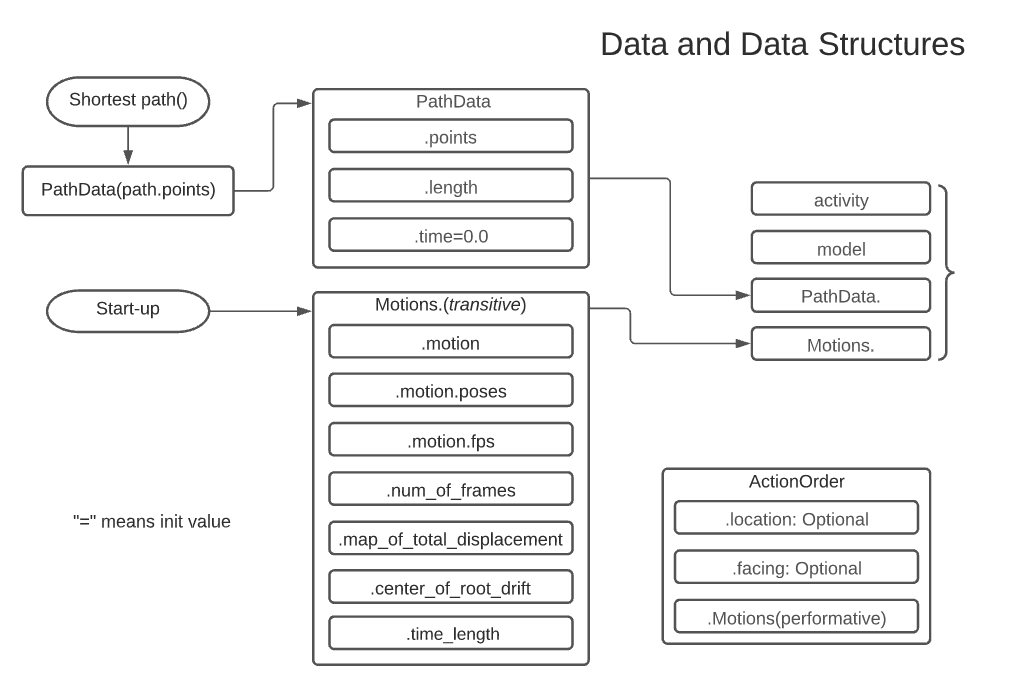 Diagram of the three main classes used to manage data
Motions Class
The
Motionsclass is a data structure that is used to preconfigure and prepare performable motion capture data from the Fairmotion API and amass motion capture datasets. It has an inner class calledMotionDatathat is written to initial form the two types of Fairmotion motion cycles for consumability of the action order processing. For example, developers can choose walk cycle frames, motion orientation, and handle a most of the precomputing necessary to speed up processing. The 'MotionData' class specializes in allowing the developer to construct two different MotionData types:PathData Class
The
PathDataclass is a data structure that is used to preconfigure and prepare performable motion capture data from the Fairmotion API and amass motion capture datasets. It has an inner class calledMotionDatathat is written to initial form the two types of Fairmotion motion cycles for consumability of the action order processing. For example, developers can choose walk cycle frames, motion orientation, and handle a most of the precomputing necessary to speed up processing.ActionOrder Class and Double Queue Workflow
The format that the
FairmotionInterfacetakes actions from the user is through theActionOrderclass. Developers can populate action orders with the Motions Class, and optionallyfacingandlocationvectors that position and orient the motion to be performed in the environment. If the optional arguments are not given, then they take the value of previous values.When the user pushes an
ActionOrderonto the order queue, the interface used time between frame drawing events to process the action order into(joint_position, transformation)tuples that are then pushed to the staging queue. Thedraw_event()from the Habitat Viewer application pops these tuples off of the staging queue and positions the character for the next frame. This process is what allows for real-time action queuing and processing that does not interrupt the character simulation.Scenic/Performative Motion Workflow
The diagram below provides a better understanding of how scenic/performative actions are handled by the processor. When given a scenic action order that must be performed somewhere different than the previous action's location, The processor simply splits the current action order into a transitive order to move the character to the new location followed by a scenic order without location. This is why each scenic order MUST HAVE an assigned transitive motion so that the processor knows what motion to build into the conjured transitive order. This can be seen in the
MotionDataclass.Tail-end Interpolation Between Action Orders
In order to produce the smooth transitions between Action Orders, the processor takes advantage of the first and last (user defined) margins of the character pose tuples to add interpolated adjustments to the motions. This can be seen in the diagram below.
How Has This Been Tested
This feature has been thoroughly tested with the Habitat Fairmotion Viewer Application
Types of changes
Checklist