- Gitea version (or commit ref): 1.12.2 and 1.13.0+dev-311-gbae5293d2
- Git version: 2.7.4 and 2.11.0
- Operating system: Ubuntu 16.04 and Debian 9
- Database (use
[x]):
- Can you reproduce the bug at https://try.gitea.io:
- Log gist:
Description
The repository's branches overview page displays, next to each non-default branch, a couple of bars that graphically show how many commits each branch is ahead and behind the default branch. The display of these bars is broken if the browser's window is between 768 and 1199 pixels wide:
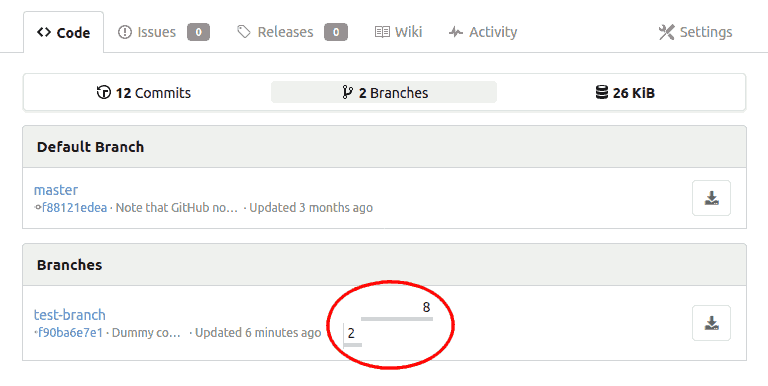
Tested on Firefox. The behavior on Chrome is qualitatively the same, although I did not check the exact width thresholds.
For reference, GitHub displays those bars correctly for widths ≥ 1012 px, and removes them on narrower windows.

[x]):Description
The repository's branches overview page displays, next to each non-default branch, a couple of bars that graphically show how many commits each branch is ahead and behind the default branch. The display of these bars is broken if the browser's window is between 768 and 1199 pixels wide:
Tested on Firefox. The behavior on Chrome is qualitatively the same, although I did not check the exact width thresholds.
For reference, GitHub displays those bars correctly for widths ≥ 1012 px, and removes them on narrower windows.