
One page that shows every agent session on your machine - Claude Code, Claude Desktop, Codex and pi - tells you which one is waiting for you, and jumps to that window when you click it.
If you run several agent sessions across several repos, the problem is not knowing that work is happening. It is noticing the one that stopped and wants an answer, and then finding which of your fifteen terminal tabs it was in. That is what this fixes.
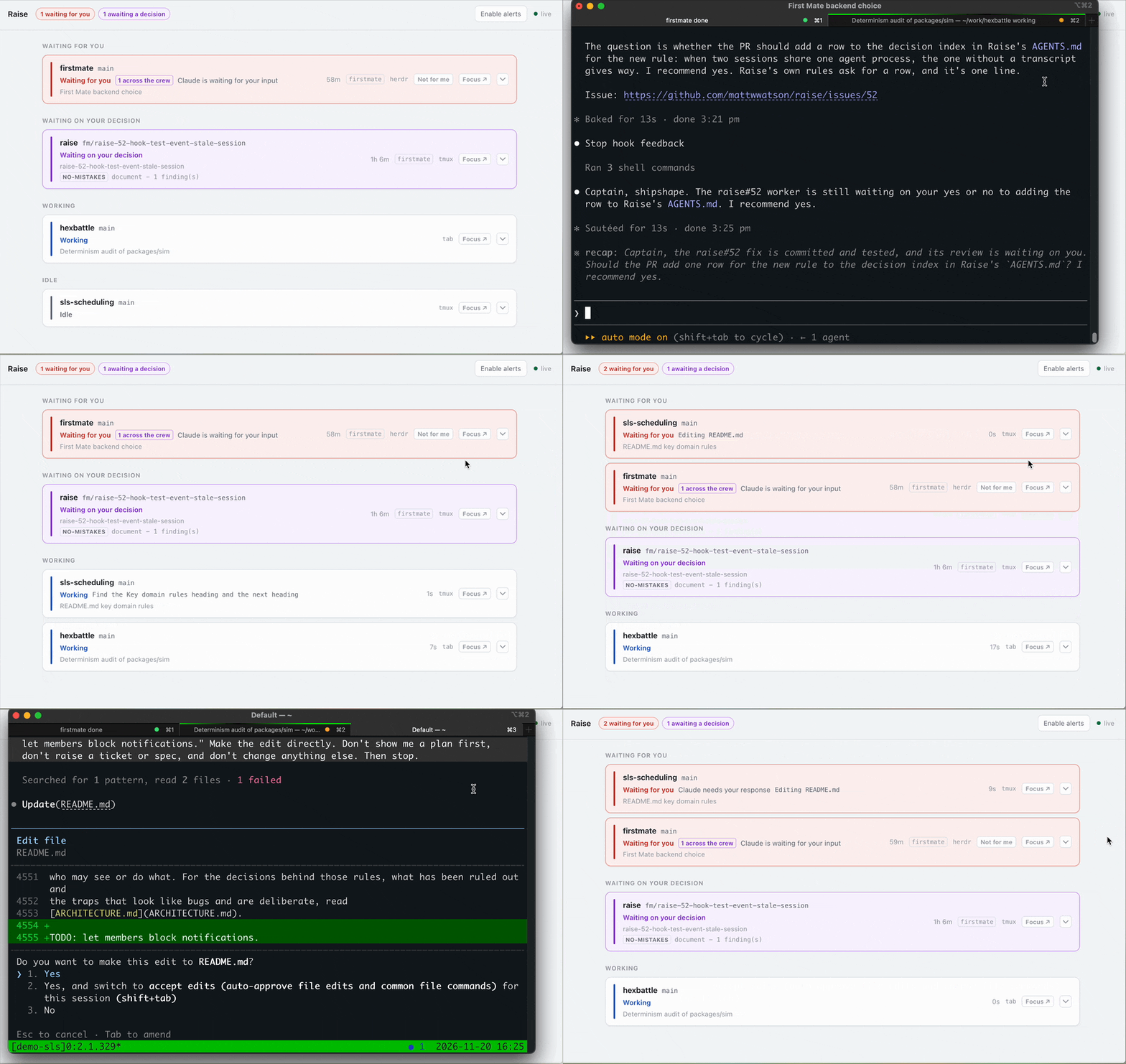
The NO-MISTAKES lines and the decision row are optional signals: they
appear if you have those tools and are simply absent if you do not. Nothing else on the page
changes.
- Node 22.13 or newer. 22.13 is where
node:sqlitestopped needing a command-line flag; earlier 22.x will not run it. - One supported agent: Claude Code, Codex or pi. More than one at a time is fine - they share the page.
- macOS, for clicking a row to raise its window. Monitoring itself runs anywhere; raising
a window is done with AppleScript, so that half is macOS-only - worth knowing now rather than
three minutes in. Raise can bring forward:
- a session running directly in Terminal.app, iTerm2 or Ghostty (1.4 or later);
- a session inside tmux, when that tmux session is attached in one
of those terminals. A detached one gets the
tmux attachcommand to run, or, withnew-tabon, opens in a new tab; - a session inside Herdr, when it is attached with an explicit
hc attach <address>in one of those terminals, or shown in the Herdr desktop app. Not when you attached by picking it fromhc's menu: Raise cannot tell which terminal a picker attach is showing. Withnew-tabon, a Herdr session nothing Raise can see is showing - one attached from the menu included - opens in a new tab instead.
There are no runtime dependencies at all - Node's own builtins and nothing else. Everything below that names another tool is optional, and says so.
npm install -g raise-cli
raise install-hooks
raise serve
Install it globally rather than reaching for npx. install-hooks writes the absolute
path of Raise's hook script into your agent's settings, and under npx that path points into
a temporary cache that npm later deletes. Your sessions then stop reporting while the page
carries on looking healthy - which is the one failure this tool exists to prevent, caused by
installing it. There is no warning when it happens, because nothing is left to warn you.
What each version changed is on the Releases page,
listing only what reaches the installed package. To upgrade, run npm install -g raise-cli@latest
and restart raise serve; the hooks point at the same place and need no reinstall.
Or from a checkout, which is what you want if you intend to change anything:
git clone https://github.com/mattwwatson/raise.git
cd raise
npm link          # puts `raise` on your PATH, pointing at the checkout
raise install-hooks
raise serve
install-hooks merges six hook entries into ~/.claude/settings.json. It shows you exactly
what it will change and asks before writing, keeps a .raise-backup copy, leaves any hooks
you already have alone, and is safe to run twice. Undo it with raise uninstall-hooks. Set
CLAUDE_CONFIG_DIR and both that file and the transcripts Raise reads follow it, as Claude
Code itself does.
When a later version of Raise adds an event to that set, serve and doctor name the ones
you are missing rather than calling the hooks uninstalled - what you already have keeps
working, and the new event only makes the signal arrive sooner. Re-run install-hooks when it
suits you, and restart your sessions then.
Restart your existing sessions afterwards. Hooks are read when a session starts, so sessions already open will not report themselves until you restart them.
Until you do, they still appear, under Not reporting to Raise - Raise finds any transcript
written in the last couple of hours that no session has claimed, and shows where it is, what
it was about and when it last wrote. Those rows are deliberately quiet: no state, no colour and
no Focus ↗, because a session that has never reported has no window we can raise and no
status we can honestly read. Restart it and it becomes an ordinary row.
Then open the URL raise serve prints and leave the tab pinned. Click "Enable alerts" once if
you want desktop notifications when something starts waiting on you.
A tab left pinned for days is running the JavaScript it downloaded on the day you opened it, so upgrading Raise underneath it changes the server and not the page. When that happens the header says Page out of date - reload, and pressing it is the whole fix. Raise will not reload the tab for you: it would throw away whatever you had expanded, at a moment you did not pick, on a page you are watching because something needs you.
Codex and pi each take one more command - Codex sessions, pi sessions.
You have just been asked to let a program merge hooks into your agent's settings and read your transcripts. Here is exactly what that means.
There are no runtime dependencies. Not "few" - none. Raise runs on Node's own builtins,
dependencies in package.json is empty and is meant to stay empty. Nothing here can be
compromised through a package you did not choose, because there is no package you did not
choose. For a tool that installs hooks into your agent and ends up running osascript, that
is the load-bearing half of the answer.
The server binds to 127.0.0.1, but that alone is not a boundary: any page open in your
browser can make requests to localhost, and DNS rebinding can point a hostile domain there.
Since this server ends up running osascript and tmux, it also requires
- a shared token, generated per install and kept
0600in~/.raise/token - a
Hostheader allowlist, which is what actually defeats DNS rebinding - an
Originallowlist
/health is the only unauthenticated route, and it returns nothing but liveness.
The hook - and pi's extension, which posts the same payload - never sends prompts, transcripts or file contents. It sends the session id, the working directory, the event name, a notification message where Claude supplies one, and the window identity needed to focus the tab. That is an allowlist rather than a promise: the hook copies out the fields it is allowed to send, so anything an agent adds to a payload in a future version stays inside your session unless someone deliberately adds it to the list.
Expanding a row shows conversation text, and that is the only place it appears. It is read from a local file by a local server and rendered in your own browser - it is not in the event stream, not in the hook payload, and not sent anywhere. The token guards that route like every other one, which is exactly why localhost alone is not treated as a boundary.
Finding the sessions that predate the hooks means listing your agents' own session
directories - ~/.claude/projects, ~/.codex/sessions and ~/.pi/agent/sessions - and
reading enough of a recent transcript to learn which directory it was working in. That is the
same kind of local read as everything above, on the same machine, and none of it goes further
than the page in your browser.
Exactly two features send anything at all, they are both off until you configure them, and with neither turned on - which is the default - Raise makes no outbound network request of any kind. They are opted into separately, in the same file, and each is described below in full.
Pull request state. Raise can ask GitHub or Bitbucket whether a pull request already on
your dashboard is still open. What goes out is that pull request's own URL, the one the row
already links to, to the forge that hosts it. Nothing else: no transcript, no prompt text, no
file contents, no branch names, no list of your repositories, and no request to any host but
that forge's own API - api.github.com, reached through gh, or api.bitbucket.org, and
nowhere else. GitHub goes through your own gh login, so Raise never sees a GitHub credential
at all; Bitbucket needs an API token with the single scope read:pullrequest:bitbucket, which
grants no access to your source code, kept 0600 in ~/.raise/config.json, never logged,
never echoed, and never sent anywhere but Bitbucket. Turning it on is one command,
raise enable pull-request-state.
The update check, which asks npm whether a newer Raise has been published, because nothing
else will ever tell you. What goes out is one HTTPS request to https://registry.npmjs.org
for this package's own name, at most once a day, and nothing else ever: no query string, no
version number, no machine or user identifier, no list of anything you have installed.
That is a small disclosure and it is not nothing, so here it is in the terms that matter. The
npm registry learns your IP address, the time, and that somebody asked about raise-cli -
and since nobody else has a reason to ask about that package, that is close enough to saying a
machine at your address has Raise installed. It does not learn which version you are on:
your version never leaves the machine, and the comparison happens here against the number the
registry sent back. Nothing else about this changes anything above - it never upgrades
anything, it is not in the hook or the extension, and the server that runs while your dashboard
is open never makes this request. Turning it on is
raise enable update-check.
Everything the hooks install is reversible - uninstall-hooks, uninstall-codex,
uninstall-pi - and so is every opt-in above, with raise disable. Every file Raise writes on
your behalf - an agent's settings, and ~/.raise/config.json - is shown to you as a diff first,
confirmed before it is written, and left with a .raise-backup beside it.
Four different things, because they answer four different questions.
| Signal | Where it comes from | What it means |
|---|---|---|
| Waiting for you | the agent's own hooks | The agent hit a permission prompt, or Claude Code has been idle waiting for input. This is the one worth interrupting yourself for. Not pi, which has no permission prompt - see the support matrix. |
| Waiting on your review | the running lavish-axi poll |
The agent is sitting in a lavish-axi poll, waiting for you to open a review page and respond. It looks busy from the outside; it is not. |
| Waiting on your decision | firstmate's own fleet snapshot | A firstmate crewmate reached something only you can settle and stopped. It asked once, in the captain's window, and that line has long since scrolled - see firstmate rulings. |
| Pipeline parked | the no-mistakes database | A run stopped at a gate. Usually the agent answers it itself within seconds, so it is informational. |
There is nothing to configure per project. Sessions report themselves through the agent's
hooks, so a repo shows up the first time you work in it and is never registered anywhere. The
pipeline half needs no setting up either: no-mistakes keeps one daemon and one SQLite database
for the whole machine, so every repo's runs are read from that one place.
Rows name themselves apart. A row is normally labelled with just the repo directory name,
but a repo, its worktrees and a second clone of it all share that name - three cards reading
payments tell you nothing about which is which. When two rows would collide, each grows
one parent directory at a time until they differ, and no further:
work/payments       /Users/you/work/payments
2/payments          /Users/you/.worktrees/payments/2/payments
docs-site           unique already, so left alone
Rows for the same place keep one name - two sessions in one repo, say. No amount of path would separate them, so they are told apart by their branch, their state, and the name you gave the session, if you gave it one.
"Working" across four repos tells you nothing about which one to look at. Every row a session has reported shows the name its agent wrote for the session, where the agent writes one, and the tool it is running this second - the quiet rows for sessions that never reported are the one exception - and when no-mistakes is driving, what the pipeline is doing gets a line of its own beneath, because the two are happening at once:
WAITING FOR YOU
  payments     Waiting for you - Claude needs your response    Editing ledger.js   2m
               Make the settlement job idempotent
WORKING
  storefront   Working                                         Running npm
               Redesign the checkout flow
That comes from the transcript the agent already writes, so it is quoted rather than guessed at. The transcript never leaves your machine: the server reads a local file and renders it on your own dashboard, in your own browser. Nothing else leaves it either, unless you deliberately turn on one of the two features that reach the network - asking a forge about a pull request, or asking npm whether there is a newer Raise. Both are off by default and Security says exactly what each sends.
Expand a row to see the last few things it did. The chevron on the right of any session row opens a panel with what you asked, what the agent said back, and every tool it ran with how each turned out - enough to decide whether to go and look without switching to the terminal.
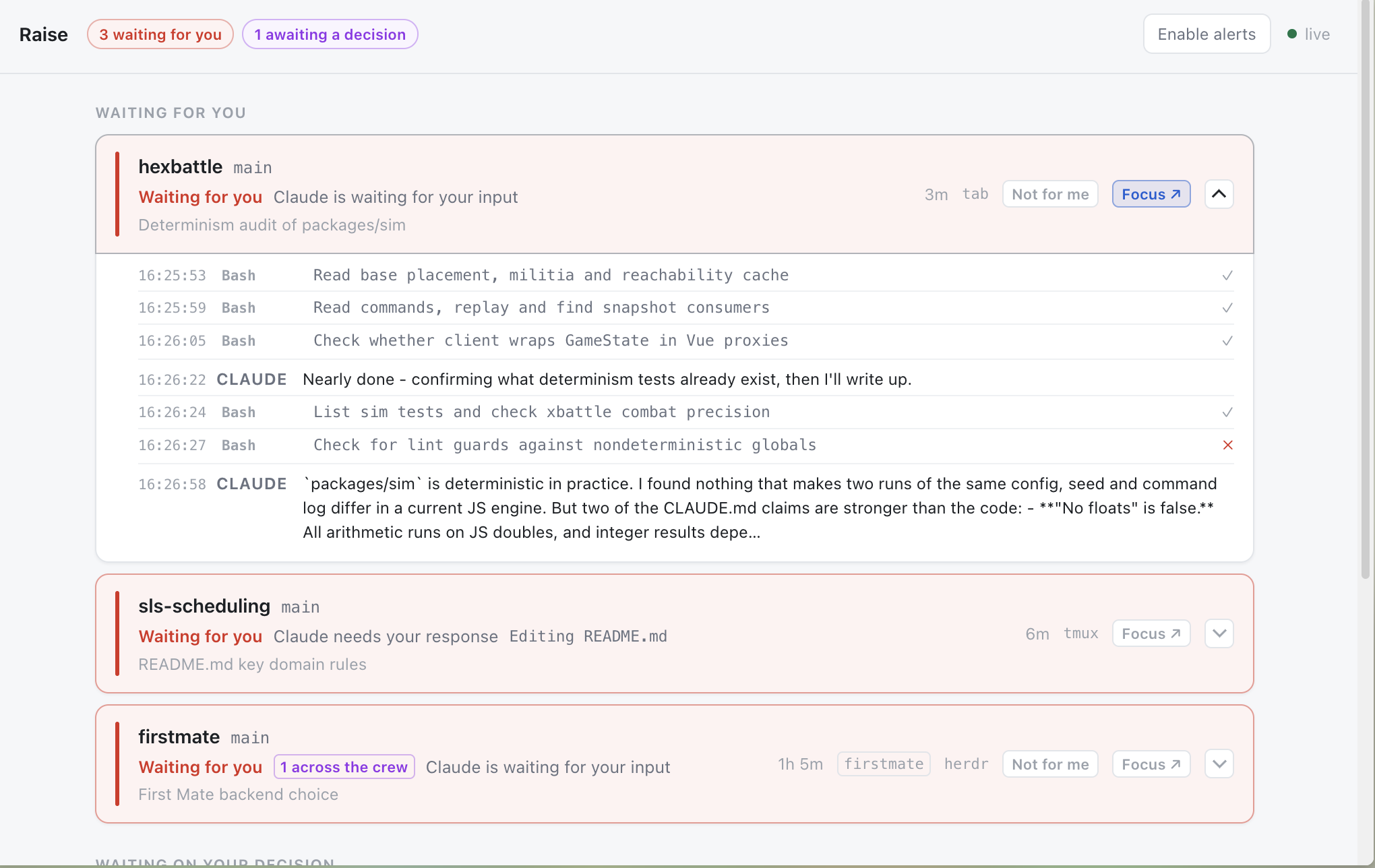
It is fetched only when you open it, one session at a time, and it refreshes while it is open. Subagent side-conversations and the boilerplate an agent injects into the user role are filtered out, so what you see is what actually passed between you and the agent.
A row links its pull request. If a branch has one open, the row shows PR #41 and takes
you to it. The state is only shown as a badge while somebody is actually watching the PR -
which, unless you turn on the forge lookup below, means a no-mistakes run still going and a
reading from the last few minutes. Once the run ends no-mistakes stops checking, so a stored
"open" can be days out of date; and a run can keep running long after anything stopped
looking, so being alive is not on its own enough. After that the link stays and the state
moves into the tooltip as "was open, last checked 3d ago". The link outlives the run on
purpose: the run is over in minutes, and the review is what you are waiting on for the rest
of the day.
Pull requests opened outside a no-mistakes run are picked up from the session's own
transcript, so a plain gh pr create still gets a link.
You can have the badge always be right, by letting Raise ask. Turning on
pull request state makes Raise ask GitHub or Bitbucket
directly, which is the one source that cannot be out of date - so a merged pull request stops
saying OPEN within the minute, and a review nobody is watching gets a real state rather than
a tooltip. It is also the only source that knows a pull request is a draft, so with it on a
draft says DRAFT rather than OPEN - waiting on its author, not on a reviewer. It is off until
you configure it, and it is one of only two things in Raise that make an outbound request.
The branch is always shown, next to the repo name, read straight from .git/HEAD - so it
is right for worktrees and for sessions that have never run the pipeline. It is also what ties
a pipeline and a pull request to a session, so a checkout on a detached HEAD shows neither
rather than borrowing whichever was nearest.
If you have named a session, the name is shown too, between the repo and the branch. Two
sessions on one repo and one branch is an ordinary day, and nothing else on the row tells them
apart - so /rename Payments migration in Claude Code, or /name in pi, is the fastest way
to make the right card obvious:
payments  Payments migration     feat/idempotent-ledger   3m  tmux  Focus ↗
Waiting for you - Claude needs your response
Make the settlement job idempotent
The AI-generated title stays on its own line underneath. The name is what you meant the session for; the title is what it turned out to be doing, and over a long session the two drift apart.
One row per repo, even while no-mistakes is running. no-mistakes does its pipeline work in its own Claude sessions, in worktrees of their own. Those show up to the hooks like any other session, so they used to arrive as extra cards titled with a run id - an unrelated-looking repo you could not click. They are now folded onto the row of the repo they are working on:
PIPELINE PARKED
  payments  PAY-63-refund-double-count                       2m  tmux  Focus ↗
  Pipeline parked at a gate
  Work out why the ledger double-counts refunds
  NO-MISTAKES  review - 2 finding(s) · Reviewing ledger.ts
If one of those agents ever stops for a permission prompt, the repo's row goes red and says so
- the pipeline has stalled and only you can free it.
What you are doing and what the pipeline is doing are separate lines, because they happen
at the same time. Your session keeps its own state and title while no-mistakes works underneath
it; the NO-MISTAKES line says which step is running and what it is up to. That works even when
there is no pipeline agent to see - a CI monitor rebasing your pull request runs inside the
no-mistakes daemon, and the line still reports it.
The pipeline lands on the session that started it. Several sessions open on one checkout
is an ordinary day, and only one of them can answer a gate - so the other cards show nothing
about the pipeline at all: no step, no parked gate, no NO-MISTAKES line. They still name the
same repo and branch, and they still link its pull request.
A run that cannot be placed gets one card of its own, at the bottom, saying it could not be traced to a session and how many of your sessions share that repo. That happens when the session that started it has gone, when it was run by hand, or when nothing was running to trace it to. It is never shown on a session that might not own it: on a page you trust to tell you who needs you, a pipeline attached to the wrong card is worse than one attached to none.
A run that has passed leaves the page, because it is finished business. A run that failed stays, until you switch that checkout to another branch.
A session in a git worktree counts here as being in the checkout the worktree was created from, because that is the repo no-mistakes registers its runs against - so a pipeline started from a worktree lands on that worktree's row rather than on an idle card for the main checkout. Sibling worktrees are told apart by their branch, so a worktree left on a detached HEAD shows no pipeline rather than the one next door's.
A session waiting on a Lavish review says so, and gives you the link back. An agent
sitting in a lavish-axi poll has stopped and is waiting for you to open a page you opened a
while ago and have since buried under thirty tabs. The hooks see a busy session, so this used
to be invisible. Now it gets its own group, ranked just under "waiting for you", with a
Review ↗ straight back to the page.
The favicon carries the most urgent state on the page, so a pinned tab tells you whether anything wants you without being opened. It goes hollow when the page goes stale, for the same reason the header dot does.
Everything on the page works the same way for all three agents - the repo, the branch, the pull request, the pipeline step, the review gate, and clicking to focus the window. What differs is what each agent is able to tell us, and where a cell below says no, that is the agent's own design rather than something missing here.
| Claude Code | Codex | pi | |
|---|---|---|---|
| Repo, branch, what it is doing right now | yes | yes | yes |
| Pull request, pipeline, review gate, click to focus | yes | yes | yes |
| Waiting for you - stopped at a permission prompt | yes | yes | never - pi has no permission prompt |
| ...and what it is asking you for | yes | no - Codex sends no message with it | n/a |
| A finished turn escalating to "waiting for you" after a minute | yes | no | no |
Not for me, to dismiss that escalation |
yes | n/a | n/a |
| A session title the agent wrote itself | yes | writes none | writes none |
| The name you gave the session | /rename |
none | /name |
| Setting it up | raise install-hooks |
raise install-codex, then approve it inside Codex |
raise install-pi |
The two rows worth reading twice:
pi never says "waiting for you", because pi ships no approval gate - its tools simply run, so there is no such state to report and Raise does not invent one. A finished pi turn shows as idle. It still reaches the top of the page honestly, through its pipeline: parked, failed, or waiting on a review.
A Codex row does turn red, and will not tell you why. Codex has a real approval gate, so it can genuinely say a human is needed - but it has no notification of any kind, so there is nothing to carry the reason and Raise does not guess one. A red Codex row means go and look; the window itself will say what it is asking.
Claude Code needs nothing beyond install-hooks above. The other two each take one command.
Codex CLI sessions are watched too, marked with a
codex chip:
raise install-codexThat merges five hooks into ~/.codex/hooks.json with the same manners as install-hooks - it
shows the change, asks first, keeps a .raise-backup, leaves your other hooks alone and in
order, and is safe to run twice. Undo it with raise uninstall-codex. Set CODEX_HOME and
both follow it, as Codex itself does.
Then start Codex and approve the hook when it asks. This is the one step that has no
equivalent for the other two agents, and skipping it looks exactly like a broken install:
Codex records a hash of each hook in its own config.toml and silently runs nothing it has
no hash for, so until you approve it, Raise sees no Codex sessions at all and says nothing
about why. Raise deliberately does not write that hash - config.toml is the record of what
you have agreed to let Codex run, and it is not a monitor's to forge.
A finished Codex turn reads idle and stays that way. There is no sixty-second nudge to escalate it, because Codex has no event for one and inventing one would put a Codex row in competition with real approval prompts on the strength of a guess. Codex writes no session title either, so a Codex row shows no summary line, the same as pi.
pi sessions are watched too, and they are marked with a pi chip so you can
tell them from Claude Code rows at a glance:
raise install-piThat adds one path to ~/.pi/agent/settings.json, with the same manners as install-hooks -
it shows the change, asks first, keeps a .raise-backup, leaves your other extensions alone
and in order, and is safe to run twice. Restart any pi sessions afterwards; extensions load at
startup. Undo it with raise uninstall-pi.
pi generates no AI title of its own, so a pi row shows no summary line. Naming the session
with /name Refactor auth still works and still shows - it appears next to the repo, the same
place Claude Code's /rename does.
Four tools light up extra rows if you have them. Raise runs with none of them, and says nothing about the ones you do not have:
| Optional | Without it |
|---|---|
no-mistakes |
No pipeline rows: nothing is parked, failed or running a step, and no pull request comes from the database. Sessions, blocks, reviews and focusing are unaffected. |
lavish-axi |
No "waiting on your review" rows. That state is detected by watching for a live lavish-axi poll and by nothing else, so without Lavish there is nothing to detect. |
firstmate |
No "waiting on your decision" rows and no crew count. The whole feature hangs off firstmate's own lock file naming a live session, so on a machine without it nothing is read and nothing is run. |
gh |
No pull request state from GitHub, if you turned that on at all - see pull request state. It is off by default, so on an unconfigured machine gh is never looked for. |
Absence is not degradation and is never reported as a fault: no warning banner, no fail in
raise doctor, and nothing shelled out looking for a command that is not there. raise doctor
lists each as -- not installed so you can tell an integration you skipped from one that
broke. Install no-mistakes later and a running monitor picks it up within a second - the
daemon creates its database on first use, and Raise looks each time it reads.
| Command | Does |
|---|---|
raise serve |
Start the monitor and print the dashboard URL |
raise open |
Print and open that URL again |
raise status |
One-shot text summary; no server needed |
raise doctor |
Check the setup and explain anything missing |
raise focus <session> |
Bring a session's window to the front from the terminal |
raise enable <feature> / disable <feature> |
Turn an optional feature on or off: pull-request-state, update-check, new-tab |
raise enable new-tab <terminal> |
Turn new-tab on for one terminal: iterm2, terminal-app, ghostty |
raise install-hooks / uninstall-hooks |
Manage the Claude Code hooks |
raise install-codex / uninstall-codex |
Manage the Codex hooks |
raise install-pi / uninstall-pi |
Manage the pi extension |
Useful flags: --port, --settings <path>, --dry-run, --yes. RAISE_PORT sets the
default port when --port is absent; if it holds something that is not a port, serve
refuses to start and says so, while raise --help still prints (that being where you go to
find out what the variable should contain).
serve asks the port itself - /health, the one unauthenticated route - rather than
trusting ~/.raise/server.json, and answers with one of three things:
| Message | Means | Do |
|---|---|---|
Raise is already running on port N (pid P) |
your own monitor is up | raise open |
Port N is held by another Raise (pid P) that this installation has no record of |
a leftover started under a different RAISE_HOME - usually a test run or a stray agent shell |
kill P, or raise serve --port <n> |
Port N is in use, and whatever is listening is not Raise |
something unrelated | lsof -nP -iTCP:N -sTCP:LISTEN |
The middle case is the awkward one: a monitor started under another RAISE_HOME writes its
record somewhere you will never look, so ~/.raise/server.json says "not running" while the
port very much disagrees. That is why serve asks the port rather than the file. doctor
reports the same states, and open refuses to print a URL when the recorded server has
stopped answering.
Any row that can be focused is a button, says Focus ↗ on the right, and raises that window
when you click it. Rows without a live agent session behind them - a pipeline running with
no session attached, or a session found on disk that has never reported one - are plain and do
nothing.
The chip beside a row says where the session lives - tmux, herdr, tab, desktop - and a
session whose window Raise could not place says no window rather than guessing at one. Focusing is
otherwise silent, since the window arriving in front of you is the answer; a short message
means you were raised onto something less than the row you clicked.
A quieter chip says who started the window, and today the only tool that declares itself is
firstmate - so a crewmate running on your behalf
is distinguishable from a session you opened yourself. It marks the crew and the first mate
alike, and only on firstmate's own evidence: an fm- tmux window, or firstmate's lock file
naming the session. Having firstmate's source open is not enough to earn it, a window some
other tool spawned gets nothing, and on a machine without firstmate nothing is looked for at
all. raise status prints the same word.
A crewmate's line under the repo name is normally Claude Code's own title for the session, as on
every other row. Firstmate starts each crewmate with the same pointer to a file rather than with
its brief, so Claude Code names every one of them alike; where a session's first prompt is that
pointer, the line shows the task id from firstmate's fleet snapshot instead - for example
search-api-12-retry-budget. A crewmate whose first prompt was anything else keeps its title.
The dot in the header is positive evidence, not the absence of an error. The server sends
a ping event every 20 seconds; if nothing arrives for 50 the dot goes red, the header reads
no response for 2m, and the whole page dims, because everything on it is now a snapshot of
the past. The page then reopens the stream to find out which it is.
This matters more than it sounds. A connection can stop carrying data long before it visibly breaks - a suspended laptop, a frozen server, a dropped NAT entry - and for a tool whose only job is telling you something needs you, quietly showing stale data is the worst thing it can do. So the page never infers that it is live; it waits to be told.
firstmate runs a crew of agents on your behalf. When a crewmate reaches something only a person can settle - a design choice, a review finding it will not overrule, two instructions that conflict - it stops and says so, once, in the captain's window. That line then scrolls, and the crewmate sits stopped until you happen to wonder what became of it.
Raise puts it on the crewmate's row: Waiting on your decision, with the count beside it and every open ruling in the expanded panel. Four open on one crewmate is ordinary rather than exceptional, so the panel lists all of them and never bounds the list quietly. The captain's own row carries the total for the whole crew, because that is the window where a ruling is actually given.
The count rides along wherever the row's own words have not already said it. A crewmate can
be holding a ruling and be stopped at a permission prompt, or sitting in a Lavish review, and
those say Waiting for you and Waiting on your review instead - so the count appears
beside them too, and 1 open next to a red row means exactly what it says. It is dropped only
where the row already reads Waiting on your decision, which has said it.
When there is no captain row to put them on - its window has gone, or firstmate's lock will not read for a tick or two - the leftovers get a card of their own, Rulings waiting, for the same reason a pipeline run that cannot be traced to a session does: a ruling shown against nobody is still better than a ruling shown against the wrong session, and both beat one quietly dropped.
It comes from firstmate's own fm-fleet-snapshot.sh --json, and the transcript is never read
and no prose is ever matched. A phrase that turns up in ordinary conversation would put a
coloured row on a session that is working fine, and a wording change upstream would remove a
signal you had learned to trust without a word. The snapshot is also the only source that
reconciles what a crewmate wrote against what it is doing now: a decision the crew resumed past
is absent from the reading, so a row that has moved on says nothing rather than raising an alarm
nobody can answer.
Two things are worth knowing about the cost, because it is the one real constraint here:
- The monitor never waits for it. The snapshot takes seconds - measured at 3.5s and again at 14s on the same machine - and Raise runs it off to one side, normally only when a crewmate has written to its own event log since the last reading, or when a crewmate shown as waiting starts writing to its own transcript again. That second one is what resuming looks like - a crewmate stopped on a ruling writes nothing - so a ruling that has been answered leaves the board on the next cycle rather than sitting there until a timer runs out. Raise looks only at whether that transcript changed, never at what is in it. The exceptions are the two states where neither event is enough to trust what is on the page: while a ruling is being shown, and while readings are failing, it is re-taken every few minutes as well. If those readings keep failing the rulings come off the page rather than sitting there looking current, and they come back the moment a reading arrives. The page updates on the next tick.
raise statusdoes wait, because a one-shot command has no later tick to answer on and printing before the answer arrives would mean printing a wrong one. So on a machine where firstmate is running,raise statustakes about as long as the snapshot does, and says so before it waits rather than sitting silent - the wait can reach a minute before it gives up, and an unexplained one reads as a hung command. The page is where to watch; the CLI is where to get a complete answer once.
raise doctor says whether firstmate was found. On a machine without it there is no lock naming
a live session, so nothing is read, nothing is run, and no row ever mentions it.
Claude Code turns a finished turn into a loud Waiting for you after sixty idle seconds, and that escalation is wanted - it is how a session asks for its next instruction. But nothing clears it. Raise retires a stale block when the transcript runs past it, and an idle session writes nothing, so a row where nothing is actually gated can sit red for as long as you leave it. One was caught at over twelve minutes.
So a row like that carries a Not for me button. Click it and the row drops to Idle and
says dismissed, on the page and in raise status alike - never silently, because a signal
quietly hidden is exactly as bad as one that is quietly wrong.
A dismissal answers one announcement, not the session. The next time anything on that session asks for you - a permission prompt above all - the row is red again immediately, with nothing for you to undo. It cannot hide something that matters.
A permission-prompt row has no button at all. That session genuinely cannot proceed without you, so there is nothing there to dismiss, and a control that must not be used is not offered.
Nor does a row waiting on a firstmate ruling. The nudge underneath one is an ordinary dismissible nudge - a crewmate that asks for a ruling stops, and a stopped session is exactly what raises the nudge - but the row now says a decision is waiting, and a ruling cannot be dismissed from here at all: answering one is firstmate's, and Raise never writes to it. A button that looked like it would quieten the row and could not is the same rule again, at the one place it matters most.
The word dismissed explains a quiet row, so it appears on nothing else. If the same session
turns red again for its pipeline, or starts working because its transcript ran on, the row says
that and only that - the marker is there to tell a quiet row apart from one with nothing to say,
and a row that is neither has no use for it.
Every terminal style collapses to the same final step - bring the tab with a given tty to the front - which is why a machine mixing plain tabs and tmux needs no configuration.
- Plain terminal tab. The session's own identifiers are captured at session start. iTerm2 tabs are matched by their session UUID, which survives the tab being dragged to another window. Terminal.app and Ghostty are matched by tty - Ghostty from 1.4, the first version that exposes one.
- tmux pane. A window can belong to more than one tmux session at once, so Raise asks for every session this pane lives in, and raises the terminal that is already showing it. Only when nothing is showing it does anything move inside tmux, and then only in that one session - never in whichever tmux happened to name first.
- tmux control mode (
tmux -CC), which is how iTerm2 hosts tmux, is a case of its own and is matched on the pane title instead. It works the same way from your side.
The host terminal for a tmux session is deliberately not stored, because a tmux session
can be detached and reattached in a different terminal entirely. If the session is detached
there is no window to focus, and Raise tells you the tmux attach command instead of failing
silently - or, with new-tab on, runs that command
itself in a new tab of the terminal you chose.
Supported terminals today: iTerm2, Terminal.app and Ghostty (1.4 or later), plus
tmux inside any of them, and Herdr terminals attached with hc attach <address> in any of
them or shown in the Herdr desktop app - see below.
Opening a session in the Claude Desktop app puts it on the dashboard too - the app runs the
same Claude Code underneath, so it fires the same hooks and needs no separate install. Those
rows are marked desktop rather than tab, and everything else about them is ordinary: the
repo, the branch, what it is working on, its pull request, and any no-mistakes run it started
all appear exactly as they do for a terminal session.
Focusing one brings the app to the front, and says so in a toast: Raise cannot reach inside
Claude Desktop to select a session, so it raises the app and leaves the sidebar to you. The
app's claude://resume link looks like the answer and is not - it imports a session rather
than switching to one, and because the app files its sessions under an id of its own, resuming
one it is already running leaves you with two entries over the same conversation. The one case
where the app would recognise the id instead of copying is a session an earlier such click
already imported, so the link would land on that duplicate rather than the session you clicked
- which is why Raise never uses it.
A session running in a Herdr terminal is marked herdr, and focusing it
brings up whatever is showing that terminal, worked out when you click:
- A terminal app holding
hc attach <address>- Raise raises that tab, in iTerm2, Terminal.app or Ghostty, exactly as it raises any other tab. - The Herdr desktop app, with a pane for it - the app comes forward on that space and tab.
- The Herdr desktop app, with no pane for it - the app comes forward showing the terminal in its focused pane for now, and a toast says so, since that pane now shows something else until you switch back.
- Nothing Raise can see - it says so and gives you the
hc attach <address>command.
With new-tab on, steps 3 and 4 both open the
terminal in a new tab running hc attach <address> instead, and that tab is what step 1 finds
on the next click. The app's focused pane is left showing what it was.
Attach with the address: hc attach t5, not bare hc or hc attach and the picker.
Raise finds the tab showing a terminal by its command line, and only a typed address puts the
terminal there. A picker client's command line stays hc whichever terminal you chose, and
Herdr offers no way to ask a client what it is showing, so Raise cannot tell two picker tabs
apart and does not guess. Every session's address is in its environment as $HC_TERMINAL_ID,
and hc ls lists them. Two tabs attached to the same address are refused for the same reason,
and fall back to the desktop app if it is running. With new-tab on you need not do this by
hand: clicking a session attached from the menu opens a typed attach of it in a new tab, and
the menu tab stays as it was.
Two limits worth knowing. The desktop app only ever reaches the default Herdr server, so a
session on another server (HC_SESSION or HC_SOCKET) is raised only through a typed attach,
and the hint names its socket. And while a second Herdr server is running, a typed attach is
not trusted at all, because hc attach t5 does not say which server's t5 it means.
A Herdr server hands its own starting environment to every terminal, so if it was first started
by an hc command typed inside tmux, every Herdr session appears to be in that tmux pane. Raise
does not go by the environment for this: the hook records whether tmux or Herdr is the session's
nearest parent process, and focuses through that one. A Claude Code or Codex session already
open picks this up at its next hook event, with no restart. A pi session loads the extension
when it starts, so restart it.
Off by default, and one of the two things in Raise that make an outbound request - what it sends and where is in Security. Turn it on with:
raise enable pull-request-stateThat writes one boolean into ~/.raise/config.json, shows you the change first, keeps a
.raise-backup beside the file, and leaves everything else in it alone. raise disable pull-request-state turns it off again.
That is the whole of it for GitHub: it goes through gh, which authenticates itself, so
there is no credential to configure and none for Raise to hold. gh needs to be installed
and logged in (gh auth login) - it requires authentication even for a public pull request.
Bitbucket has no equivalent CLI, so it needs a token. Create an
API token with scopes
under Account settings → Security → API tokens, select Bitbucket as the app, and give
it read:pullrequest:bitbucket and nothing else. That scope allows viewing pull requests
and explicitly does not imply read:repository:bitbucket, so a token minted for Raise
cannot read your source code. The token is the one thing you still write by hand, because
a token given on a command line is a token in your shell history and in every ps on the
machine - so there is no flag for it. Open ~/.raise/config.json and add it beside the opt-in
raise enable wrote, with the Atlassian account email it belongs to, because Bitbucket
authenticates with both:
{
  "forge": {
    "enabled": true,
    "bitbucket": { "email": "you@example.com", "token": "..." }
  }
}
The file must be 0600. It holds a credential, so if anyone else on the machine can read
it Raise refuses the whole file - opt-in included - and raise doctor says so rather than
quietly doing nothing. raise enable and raise disable write it 0600 and repair the mode
if it has been made looser, so this only needs thinking about if you created the file yourself.
There is nothing to restart. A running raise serve picks the file up as you write it, so
turning the lookup on, correcting a token or fixing the mode all take effect within a second -
and raise doctor never reports something the monitor is not actually doing.
Everything about this fails silently and completely. No gh, no login, no credential, no
network, a repository the token cannot see, a rate limit: each of them leaves the row exactly
as it would have been, showing whatever no-mistakes last knew. Failures are remembered too, so
a repository Raise cannot read is asked once and then left alone for fifteen minutes rather
than retried every minute forever - though editing the config file clears that immediately, so
a corrected credential is never a wait. An open pull request is re-checked about once a minute;
a merged one is never asked about again, because it cannot un-merge.
A forge answer ages like any other reading: if the lookups stop answering, the badge goes back
to the tooltip's "was open, last checked" within five minutes rather than sitting on an
answer nobody can confirm. A MERGED badge is the one exception, and it is the same rule -
that answer cannot change, so there is nothing for it to go stale against. Turning this on can
only ever make a badge more current than it would have been without it, never less.
Also off by default, opted into separately - what it sends and to whom is in Security:
raise enable update-checkEvery opt-in lives in the one file, and each command merges its own setting into it, so turning
this on cannot disturb pull request state or the Bitbucket credential beside it. The 0600
rule is the file's rather than either feature's: if anyone else on the machine can read it,
Raise refuses the whole file and raise doctor says so.
Why this is worth a config file at all. npm has no way of telling you. A published version
sits in the registry and your install stays on whatever it has until you reinstall or happen to
notice it in npm outdated -g - and for a monitor that is the wrong way round, because the
fixes worth having are the ones that stop a row telling you something untrue, and whoever is
running that row is exactly who will never find out.
This one does need a restart, unlike pull request state. The registry is asked once, when
raise serve starts, so a server already running will not begin checking until you restart it -
and raise enable update-check says so rather than promising otherwise.
With it on, raise serve says so at startup, once, and nothing else changes:
  A newer Raise is available. You have 0.1.0; 0.2.0 is on npm.
  Upgrade with npm install -g raise-cli.
What the newer version contains is on the Releases page.
It never upgrades anything. It does not appear on the dashboard - that page is for your sessions, not for us - and there is nothing in the hook or the pi extension, which run inside your agent and are held to stricter rules again.
It asks at most once a day and tells you every time. Those are two different things on
purpose. The answer changes every few weeks, so asking more often than daily buys nothing and
would turn a wrapper script that restarts serve into a request a minute; the banner is read at
every start, so a notice shown once and scrolled past is a notice nobody acted on. The answer is
kept in ~/.raise/update-check.json, which means restarting serve ten times in an afternoon
is ten notices and one request.
raise doctor reports it too, and reports it without asking anybody - it prints what the
last check found and how long ago that was, so it stays instant and truthful with no network.
If the check has not answered, or the two version numbers are not ones it can rank against each
other, it says so rather than saying you are up to date.
Everything about it fails silently: offline, a timeout, a rate limit, an answer it cannot make
sense of. Each leaves raise serve printing exactly what it printed before you turned this on,
and the failed attempt is remembered too, so a laptop with no network makes one attempt a day
rather than one per start.
Off by default, like the two above. With it on, clicking a tmux session that no terminal is
attached to, or a Herdr terminal that no tab and no app pane shows, opens it in a new tab of the
terminal you chose - running the same command the hint would have given you - and brings that
terminal forward. There is no toast: the tab arriving is the feedback, as for any other click.
The next click raises that tab through the ordinary paths, because it is an attached tmux
client or a typed hc attach.
raise enable new-tab             # the one supported terminal that is running
raise enable new-tab ghostty     # or name it: iterm2, terminal-app or ghostty
Raise never guesses which terminal. Nothing a session reports can say: every Herdr terminal
reports Herdr's own ghostty, and a tmux session reports whichever terminal started the tmux
server. So the terminal is written into ~/.raise/config.json once - the one you name, or, if
you name none, whichever of iTerm2, Terminal.app and Ghostty (1.4 or later) is running. With
more than one running, or none, the command refuses and says how to name one, and it refuses a
name it does not know rather than writing it. Run it again with another name to switch.
raise disable new-tab turns it off and keeps the terminal, so turning it back on needs no
name.
The tab opens in the terminal's front window, or in a new window if it has none, and a terminal
that is not running is started - you named it. Terminal.app opens a new window rather than a
tab, so if you would rather have a new tab, use iTerm2 or Ghostty. Its scripting dictionary
has no way to make a tab, short of sending it Cmd-T through System Events, which needs the
Accessibility permission and lands in whichever window is in front. A new tmux client resizes the session to its own tab, which is tmux's default
(window-size latest).
It is a fallback, after everything that already shows the session:
- A tmux session with a client attached is raised as before. The new tab opens only when nothing is attached, and on the pane you clicked.
- A Herdr terminal shown by a typed
hc attach, or in the desktop app's own pane for it, is raised as before. When the app is running with no pane for it, it opens in a new tab rather than taking over the app's focused pane. A terminal you attached fromhc's menu can now be shown too. - Where a tab may already be showing it - two typed attaches, a typed attach in a terminal Raise has no adapter for, or one Raise cannot tell from another Herdr server's - nothing new opens, because a second copy is not what you asked for. You get the answer you would have had with this off.
- If the tab cannot be opened, you get the answer and the command you would have had with it off.
A session on its own tmux socket, or on a Herdr server other than the default, opens on that
socket or server. tmux and hc are run by the absolute path Raise found them at, because a
terminal started from the Dock searches a much shorter PATH than your shell does.
It makes no outbound request. It runs tmux or hc in a terminal on this machine, through
AppleScript, like the rest of focusing, and it is macOS-only for the same reason. It is read on
every click, so a running raise serve follows it with no restart.
Nothing appears. Run raise doctor. The usual cause is hooks installed but sessions not
restarted - in which case your sessions are on the page already, under Not reporting to
Raise, and restarting each one turns it into an ordinary row. On Codex it is more likely the
approval step: Codex runs no hook it has no hash for, so
approve it inside Codex and restart.
A row says "Not tracked" and does nothing. That is the above: nothing has ever reported that session, so all Raise has is a transcript it found on disk. It cannot say whether the session is working, finished or stopped at a prompt - a session in all three states writes the same file - and it has no window identity to focus, so it offers no button rather than one that would not work. Restart the session.
A session shows but is not clickable. It started before the hooks were installed, so it never reported a window identity. Restart it. A Claude Desktop session that predates this feature is the one exception - it needs no restart, and becomes clickable the next time you send it anything.
"tmux session X is not attached to any window." Exactly what it says - attach it with the command shown and it becomes focusable.
A warning banner about the no-mistakes database. Raise probes the schema each time it
reads, and if a no-mistakes version moves the columns it depends on, it falls back to reading
each repo through no-mistakes axi status instead of guessing. Pipeline state still works; it
is just limited to repos that have a live agent session. Worth reporting so the fast path can
be updated - and the banner clears itself, with no restart, once the schema is one Raise
knows again.
This banner means a no-mistakes that is installed and cannot be read. Not having no-mistakes at all is silent by design - see Optional signals.
No pipeline rows, ever. Check raise doctor. If it says -- no-mistakes not installed
then Raise is looking in ~/.no-mistakes/state.sqlite and finding nothing, which is the
supported no-no-mistakes setup rather than a fault. NM_HOME moves where it looks.
Other people are working on this, and so is Anthropic. All of them are worth your time.
claude agents is inside Claude Code
already - one screen for the sessions it is running in the background, grouped by what is
running, what needs your input and what is done. Nothing to install, and it dispatches new
sessions as well as watching them, which is a job this does not do at all.
Switchboard is a desktop app for browsing and searching every Claude Code session you have ever had. Its full-text search - find the session by what was discussed, not by when it happened - does something nothing here does, and it runs on Linux and Windows as well as macOS.
signalbox is a menubar jumplist across Cursor, Claude Code, Codex, OpenCode and pi. It reaches further than this does: there is an iOS app, and a remote hub that can forward several machines' events onto one board.
This one is a page you leave pinned on a second monitor. It watches the sessions you have open yourself, in your own terminal tabs, across Claude Code, Codex and pi, and it is built around one question: which of them has stopped and needs a human - and take me to that window.
Checked 12/08/2026. All three are actively developed, so some of the above will age.
npm test          # no network, no build step
npm run lint
npm run typecheck
Every pull request runs all three, plus the two roadmap checks below, and the tests again on Node 22 to keep the version requirement above honest.
Architecture, conventions and the file layout are in AGENTS.md, which also indexes
the design decisions behind them - the reasoning for each lives in the header of the module that
owns it. What a contribution has to clear is in
CONTRIBUTING.md - a new terminal is one entry and a test, and that is the
contribution the architecture was shaped for. Changes are pushed through the
no-mistakes pipeline rather than straight to the
remote, the maintainer's included; CONTRIBUTING.md has the two commands. Security reports go through
SECURITY.md rather than an issue.
Releases are prepared by npm run release -- <patch|minor|major>, which opens a pull request
carrying the version bump and the generated release notes for review. Merging it stages the
package on npm from GitHub Actions, with no npm token anywhere and a provenance attestation, and
the maintainer approves it with 2FA before it is public. --dry-run prints the notes and
changes nothing. The step-by-step is in the
release-workflow skill.
Every item that has been picked up has a written spec in docs/tasks/, in this
repository - what was built, and the reasoning behind it. npm run tasks prints the board from
those files, which is the same board without the ordering.
The items are issues and their order is the board, top down - the order being the only thing that is not on disk, since a spec says how an item works and never when it is due. Until 12/08/2026 both sat in a private tracker and this paragraph said so; they are public now, so the whole roadmap is.
npm run tasks:links and npm run tasks:gate are the two checks CI runs over the specs, the
second asserting that the spec for a pull request's item already says shipped. The commands
are summarised in AGENTS.md; what each reports, and why
only those two run in CI, is in the
roadmap-workflow skill.