Environment
- Operating System:
Darwin
- Node Version:
v16.19.0
- Nuxt Version:
3.0.0
- Nitro Version:
1.0.0
- Package Manager:
npm@8.19.3
- Builder:
vite
- User Config:
modules, content, css
- Runtime Modules:
@nuxt/content@2.2.2, @nuxt/image-edge@1.0.0-27809804.194d2d6
- Build Modules:
-
Reproduction
Minimal reproduction:
https://content.nuxtjs.org/examples/essentials/document-driven
Also seeing it in my own project:
https://github.com/ceceliacreates/nuxt-content-v2-doc-driven
Describe the bug
On the about page in the example for document driven mode in the docs, the
<div class="pb-4 border-b border-gray-500">
      Article layout
    </div>
Above the <slot /> appears twice when navigating to the page.
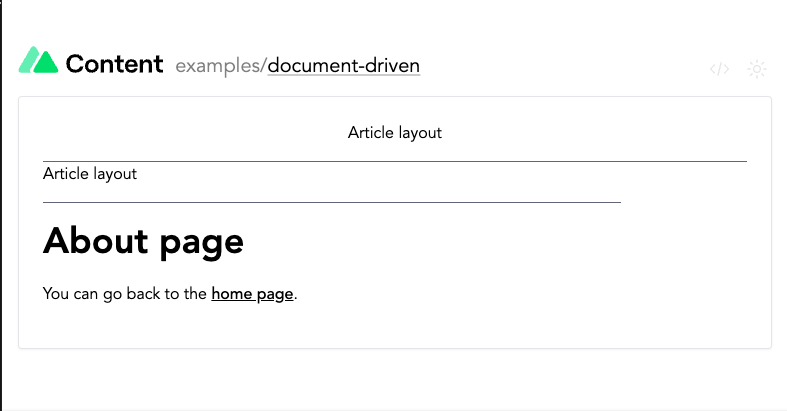
This is happening for my project as well. Components around the <slot /> appear twice when navigating to the page with the blog.vue layout. On refresh, the duplicate components disappear and the page renders correctly.
Additional context
No response
Logs
No response

Environment
Darwinv16.19.03.0.01.0.0npm@8.19.3vitemodules,content,css@nuxt/content@2.2.2,@nuxt/image-edge@1.0.0-27809804.194d2d6-Reproduction
Minimal reproduction:
https://content.nuxtjs.org/examples/essentials/document-driven
Also seeing it in my own project:
https://github.com/ceceliacreates/nuxt-content-v2-doc-driven
Describe the bug
On the about page in the example for document driven mode in the docs, the
Above the
<slot />appears twice when navigating to the page.This is happening for my project as well. Components around the
<slot />appear twice when navigating to the page with theblog.vuelayout. On refresh, the duplicate components disappear and the page renders correctly.Additional context
No response
Logs
No response