Skip to content

Conversation

@imajit
Copy link
Contributor

@imajit imajit commented Jun 25, 2021

Part of #9686
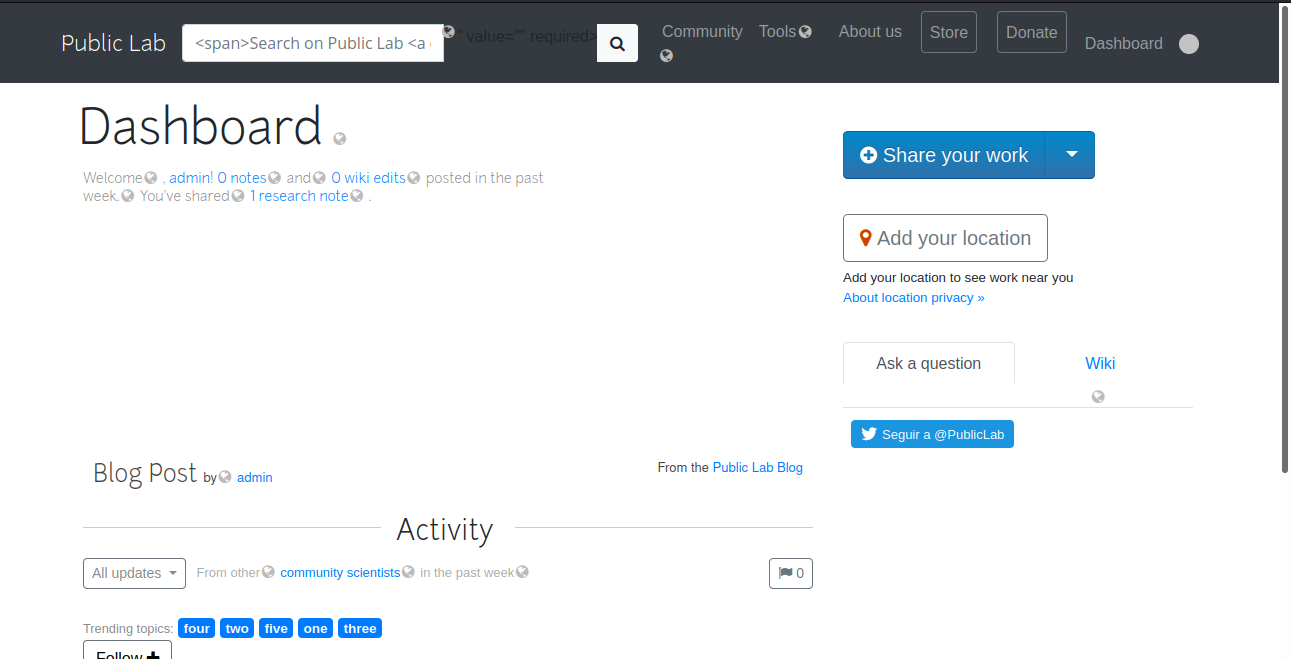
Screenshot from 2021-06-26 01-23-06
I'm trying to check if <span> occurs in placeholder but it doesn't seem to work, when I try to search the word Search then the test works.
Not able to figure out what is the mistake in this 😕 @jywarren can you please help me out with this one ?

@gitpod-io
Copy link

gitpod-io bot commented Jun 25, 2021

@jywarren
Copy link
Member

Looks like the error is:

========== FAIL I18nTest#test_should_translate_search_input_bar (278.62s)
        Expected at least 1 element matching "#searchform_input:match("placeholder",/span/)", found 0..
        Expected 0 to be >= 1.
        test/integration/I18n_test.rb:13:in `block (2 levels) in <class:I18nTest>'
        test/integration/I18n_test.rb:7:in `each'
        test/integration/I18n_test.rb:7:in `block in <class:I18nTest>'

@noi5e
Copy link
Contributor

noi5e commented Jul 12, 2021

@imajit, I'm playing around with this right now in GitPod. I don't know very much about the areas you're working on. I'm doing a lot of catch-up to try and understand what this test is supposed to do.

It looks like /change_locale/es 404s in GitPod if I visit this URL. Not sure if that's how it's supposed to work:

Screen Shot 2021-07-12 at 12 54 12 PM

assert_select '#searchform_input:match("placeholder",?)',/span/

I'm not familiar with this :match("placeholder",?) selector, is that a CSS or Capybara thing? Can you point me to documentation for it?

I'm guessing that this line is looking up the placeholder attribute on the #searchform_input element, and checking to see if the phrase span is included in it. It might be an encoding issue or something? <span> would appear in the raw HTML, but not as it displays on the page. 🤔

Is there an equivalent of take_screenshot in an integration test? It would help to see what #searchform_input actually looks like on this page.

@imajit
Copy link
Contributor Author

imajit commented Jul 12, 2021

@imajit, I'm playing around with this right now in GitPod. I don't know very much about the areas you're working on. I'm doing a lot of catch-up to try and understand what this test is supposed to do.

It looks like /change_locale/es 404s in GitPod if I visit this URL. Not sure if that's how it's supposed to work:

Screen Shot 2021-07-12 at 12 54 12 PM
assert_select '#searchform_input:match("placeholder",?)',/span/

I'm not familiar with this :match("placeholder",?) selector, is that a CSS or Capybara thing? Can you point me to documentation for it?

I'm guessing that this line is looking up the placeholder attribute on the #searchform_input element, and checking to see if the phrase span is included in it. It might be an encoding issue or something? <span> would appear in the raw HTML, but not as it displays on the page. thinking

Is there an equivalent of take_screenshot in an integration test? It would help to see what #searchform_input actually looks like on this page.

I wrote this test to check if UI breaks for Translation team members. It is able to fetch the Search ... string correctly( I tried that in the commented line) but when I try to do the same for <span> it fails

@noi5e
Copy link
Contributor

noi5e commented Jul 12, 2021

I wrote this test to check if UI breaks for Translation team members. It is able to fetch the Search ... string correctly( I tried that in the commented line) but when I try to do the same for it fails

Ah, okay, so this line does work:

assert_select '#searchform_input:match("placeholder",?)',I18n.t('layout._header.search')

That means the page and element are rendering correctly, and you can search for the placeholder attribute.

Why don't you just puts or p to the console, and see what the output for placeholder is? That way you can see if it includes span.

@jywarren
Copy link
Member

Is there an equivalent of take_screenshot in an integration test? It would help to see what #searchform_input actually looks like on this page.

I don't think there is. Integration tests are the closest thing to system tests but still don't run in a "real" browser. They're still simulated just by parsing the response from the application in text, rather than actually rendering it. But good thought... we could alternatively try a system test if that's going to be easier, though it "costs" a little more compute time.

@jywarren
Copy link
Member

I do recall that the parsing and matching in integration tests is notoriously fickle, one reason why it made sense to move to system tests where it really is just a browser. :-////

@Tlazypanda
Copy link
Collaborator

Hey @imajit @jywarren @noi5e I tried this locally by hitting the change_locale endpoint and I can't see this span text in the textbox actually which can justify why the test is failing but then I am not sure if the way to run this was right. Can you exactly comment on what are the steps to reproduce or check this locally?

@imajit
Copy link
Contributor Author

imajit commented Jul 17, 2021

Hey @imajit @jywarren @noi5e I tried this locally by hitting the change_locale endpoint and I can't see this span text in the textbox actually which can justify why the test is failing but then I am not sure if the way to run this was right. Can you exactly comment on what are the steps to reproduce or check this locally?

Hi! This is only visible to users having translation-helper user tag. The issue is not there at present, I have resolved it by adding false parameter in the translation function here

<input aria-label="Enter Search Query" type="text" id="searchform_input" class="form-control search-query typeahead" role="search" qryType="tags" placeholder="<%= translation('layout._header.search',{},false) %>" value="<%= params[:query] %>" required>
. I wanted to add this test make sure the function does not break with later changes .
To reproduce the error you need to add translation-helper tag and remove the false parameter. You can see the UI error in /change_locale/es

@noi5e
Copy link
Contributor

noi5e commented Jul 19, 2021

I put a console log into the test:

puts assert_select '#searchform_input'

Which has this output:

<input aria-label="Enter Search Query" type="text" id="searchform_input" class="form-control search-query typeahead" role="search" qrytype="tags" placeholder="Search on Public Lab" value="" required>

Looks like the placeholder attribute doesn't have span in it, which would make this test fail(?) Sorry if this confuses things, I'm still trying to figure out what the expected behavior here is.

In the original comment's screenshot, it looks like <span> is visible onscreen in the search placeholder. That's not what we want... Right?

@imajit
Copy link
Contributor Author

imajit commented Jul 19, 2021

I put a console log into the test:

puts assert_select '#searchform_input'

Which has this output:

<input aria-label="Enter Search Query" type="text" id="searchform_input" class="form-control search-query typeahead" role="search" qrytype="tags" placeholder="Search on Public Lab" value="" required>

Looks like the placeholder attribute doesn't have span in it, which would make this test fail(?) Sorry if this confuses things, I'm still trying to figure out what the expected behavior here is.

In the original comment's screenshot, it looks like <span> is visible onscreen in the search placeholder. That's not what we want... Right?

Yes, that is true, we do not want the span in the placeholder. I wanted to keep this test with the logic that if we change any other function that breaks the UI this test will fail. For now, I have written the reverse logic that when UI breaks the test will pass just to see if the test actually finds the break or not. If this passes then I will just switch the condition so that it fails when the UI breaks.

I also tried to write a system test for this based on changes in #9878 , it works with search but fails with span, I guess tests work differently than actual browsers in rendering nested HTML tags.

@imajit
Copy link
Contributor Author

imajit commented Jul 20, 2021

  test 'should translate search input bar' do
    visit '/'
    click_on 'Login'
    fill_in("username-login", with: "admin")
    fill_in("password-signup", with: "password")
    click_on "Log in"
    visit '/dashboard'
    uid = users(:admin).id
    visit '/profile/tags/create/'+uid.to_s+'?translationswitch=yes&name=translation-helper"'
    available_testing_locales.each do |lang|
      visit '/change_locale/es'
      visit '/dashboard'
      assert_selector(:xpath,'.//input[@id="searchform_input"][contains(@placeholder,"search")]')
      #assert_selector(:xpath,'.//input[@id="searchform_input"][contains(@placeholder,"span")]')
    end
  end

@noi5e
Copy link
Contributor

noi5e commented Jul 20, 2021

@imajit Nice! Does that system test work?

As to why the integration test wasn't able to find it... <span> is being inserted into the search form input via the DOM. Therefore, searching for it as a raw HTML attribute wouldn't find it. But I'm not 100 on that 🤷

@imajit
Copy link
Contributor Author

imajit commented Jul 20, 2021

@imajit Nice! Does that system test work?

As to why the integration test wasn't able to find it... <span> is being inserted into the search form input via the DOM. Therefore, searching for it as a raw HTML attribute wouldn't find it. But I'm not 100 on that shrug

No even this doesn't seem to work 😞 , it needs changes made in #9878 so won't work for now in local dev.

@imajit
Copy link
Contributor Author

imajit commented Jul 20, 2021

I too think as the span part is inserted by the helper, the integration test won't be able to search it in the raw HTML

@noi5e
Copy link
Contributor

noi5e commented Jul 22, 2021

@imajit, I was thinking about this today, and I remembered there are some system tests that run JavaScript within the headless browser. Check out:

test "#{page_type_string}: ctrl/cmd + enter comment publishing keyboard shortcut" do
visit get_path(page_type, nodes(node_name).path)
find("p", text: "Reply to this comment...").click()
# Write a comment
page.all(".text-input")[1].set("Great post!")
page.execute_script <<-JS
// Remove first text-input field
$(".text-input").first().remove()
var $textBox = $(".text-input");
// Generate fake CTRL + Enter event
var press = jQuery.Event("keypress");
press.altGraphKey = false;
press.altKey = false;
press.bubbles = true;
press.cancelBubble = false;
press.cancelable = true;
press.charCode = 10;
press.clipboardData = undefined;
press.ctrlKey = true;
press.currentTarget = $textBox[0];
press.defaultPrevented = false;
press.detail = 0;
press.eventPhase = 2;
press.keyCode = 10;
press.keyIdentifier = "";
press.keyLocation = 0;
press.layerX = 0;
press.layerY = 0;
press.metaKey = false;
press.pageX = 0;
press.pageY = 0;
press.returnValue = true;
press.shiftKey = false;
press.srcElement = $textBox[0];
press.target = $textBox[0];
press.type = "keypress";
press.view = Window;
press.which = 10;
// Emit fake CTRL + Enter event
$textBox.trigger(press);
JS
assert_selector('#comments-list .comment', count: 2)
assert_selector('.noty_body', text: 'Comment Added!')
end

Basically I think you would be able to get this test to work if you did that, and used JS methods that look through the DOM for the value you want. Something like document.getElementById("searchform_input").getAttribute("placeholder")

get '/dashboard'
follow_redirect!
#assert_select '#searchform_input:match("placeholder",?)',I18n.t('layout._header.search')
assert_select '#searchform_input:match("placeholder",?)',/span/
Copy link
Member

Choose a reason for hiding this comment

The reason will be displayed to describe this comment to others. Learn more.

now that #9878 is merged did you want to rebase this? Just linking relevant lines here:

search: "Search on Public Lab"

<input aria-label="Enter Search Query" type="text" id="searchform_input" class="form-control search-query typeahead" role="search" qryType="tags" placeholder="<%= translation('layout._header.search',{},false) %>" value="<%= params[:query] %>" required>

So since we don't have a spanish equivalent, you're looking for the helper now:

https://github.com/publiclab/plots2/blob/main/config/locales/es.yml

Is it inserting this via JavaScript after the page is rendered, or in Ruby before?

Copy link
Member

Choose a reason for hiding this comment

The reason will be displayed to describe this comment to others. Learn more.

Since we're passing html = false, it should show line 167, which is just the translated string if it exists, or the English if it doesn't, right? This is all in Ruby so the only JS needed is when the placeholder is built in JavaScript. That said, are we sure the Bootstrap UI scripts (which build the placeholder) run in the limited "simulation" of a browser in integration tests? If not, best move this over to a system test as you've discussed.

@imajit imajit force-pushed the translation-tests branch from b1abd50 to 4ebec79 Compare July 25, 2021 17:06
@imajit imajit requested a review from a team as a code owner July 25, 2021 17:06
@imajit
Copy link
Contributor Author

imajit commented Jul 25, 2021

Screenshot from 2021-07-25 22-16-44
Screenshot from 2021-07-25 22-46-39

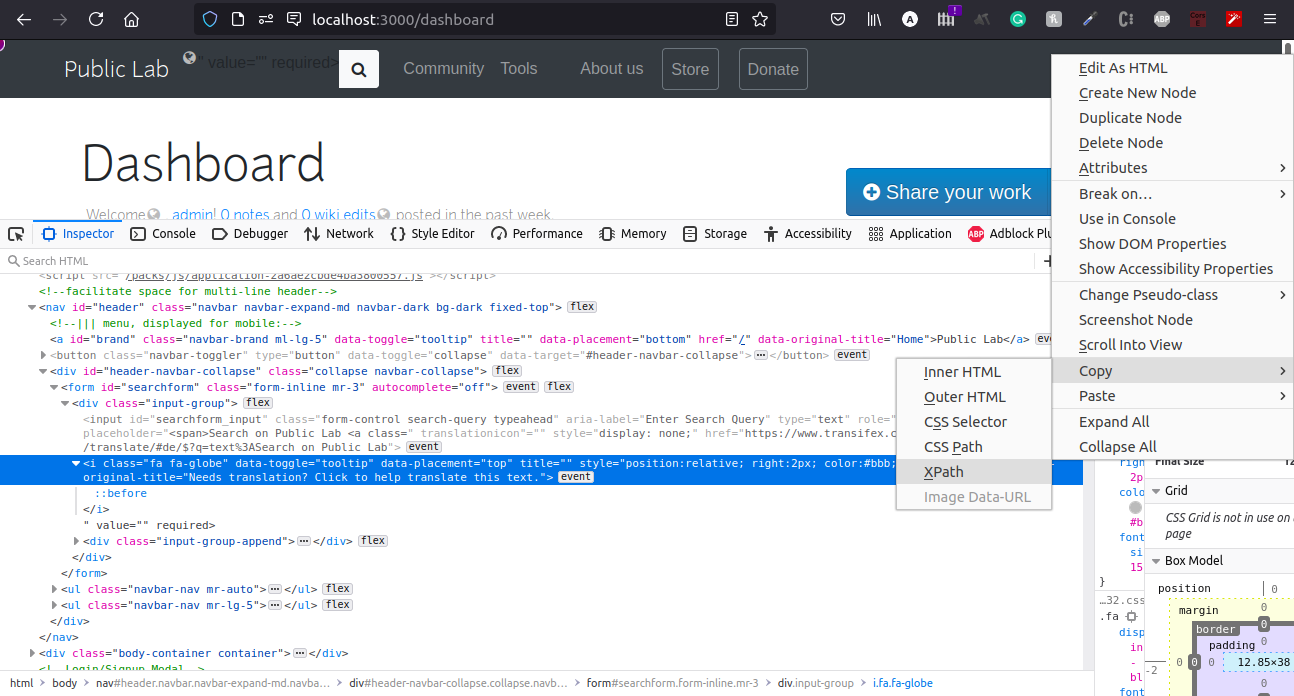
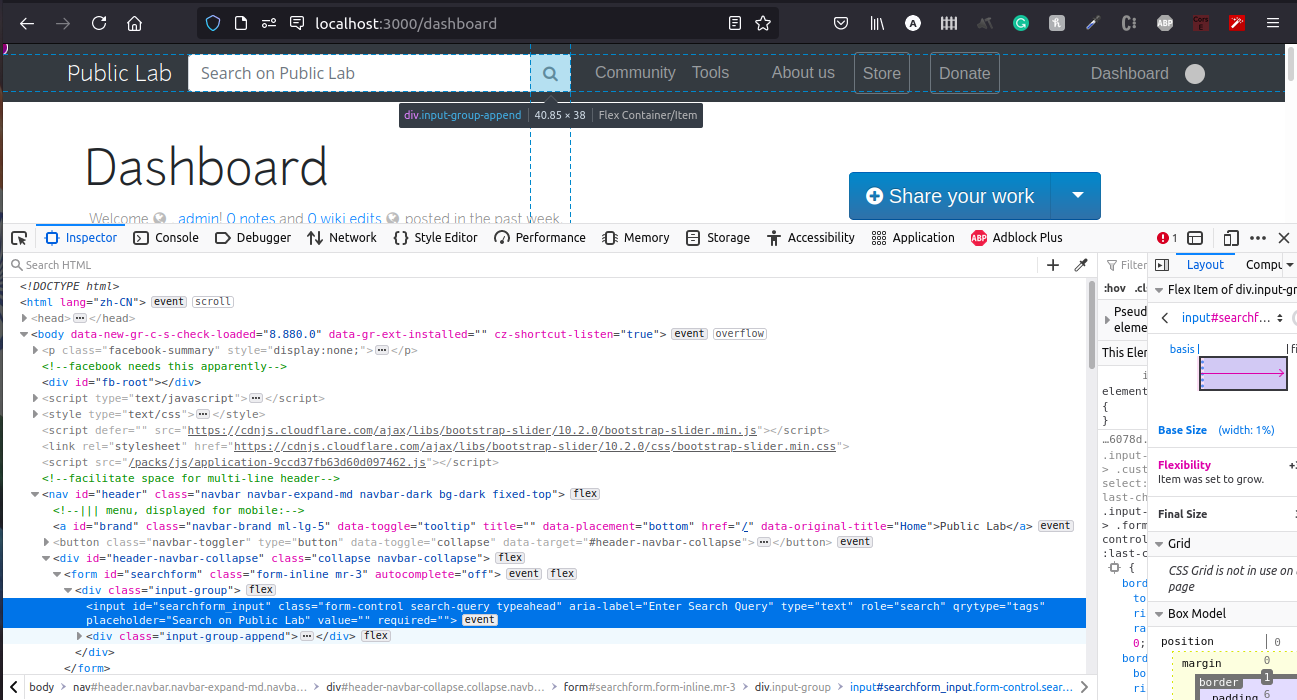
In my previous commits, I was not writing the xpath correctly and when I saw the web browser console, I found out that the i tag is rendered outside so I tried to check it the i tag is rendered or not, when the UI breaks but somehow it still does not work.
I have added the failing test as a comment

I'm not sure but can this be a possibility that the tests are running before the helper function renders the HTML ?

@noi5e
Copy link
Contributor

noi5e commented Jul 27, 2021

I think having this as a system test definitely is the way to go.

I also agree that maybe the test is not finding elements because the page isn't fully loaded. Maybe inserting more page.find calls is the way to go... I noticed that the system test you posted in a comment doesn't have page.find calls, so that could be why the test isn't finding the element. The comment system tests have a lot of examples of this kind of thing.

Regarding JS in system tests, I also want to point out this code which inserts a new HTML element onto the page after it's loaded:

def drop_in_dropzone(file_path, dropzoneSelector)
existing_inputs = page.all('.fakeFileInput')
new_input_id = 'fakeFileInput' + (existing_inputs.size + 1).to_s
# Generate a fake input element
fake_file_input = page.execute_script <<-JS
const newInputId = '#{new_input_id}';
fakeFileInput = window.$('<input/>').attr(
{id: '#{new_input_id}', class: 'fakeFileInput', type:'file'}
).appendTo('body');
return fakeFileInput;
JS

Then the system test uses it to simulate someone drag & dropping an image for upload:

test "#{page_type_string}: IMMEDIATE image DRAG & DROP into REPLY comment form" do
Capybara.ignore_hidden_elements = false
visit get_path(page_type, nodes(node_name).path)
find("p", text: "Reply to this comment...").click()
# Upload the image
drop_in_dropzone("#{Rails.root.to_s}/public/images/pl.png", ".dropzone-large")

I know it's unrelated, but it's just a for-example showing that it's possible for system tests to manipulate the DOM, and get the true and current attributes of HTML elements, like the <span> element if it's being inserted by a helper after page load.

Definitely try page.find stuff to wait for the page to fully load, and if that doesn't work I still think it's doable with JS!

@jywarren
Copy link
Member

So the key here i THINK is not that the helper won't have rendered yet, since that's all on the server side in ruby, but that the key markup is within a Bootstrap "popover" - https://getbootstrap.com/docs/4.4/components/popovers/ - which is created after Bootstrap JavaScript executes - it pulls out the popover attribute and then generates new HTML and inserts it into the page to create the popover. Integration tests don't run JavaScript at all, actually! So we have to do this as system test as @noi5e points out.

After that you may still have some timing issues and can try other techniques that @noi5e suggested. But I hope simply running this in system tests will fix most of it!

@imajit imajit force-pushed the translation-tests branch from 4ebec79 to 1dd2aac Compare July 31, 2021 18:32
@qlty-cloud-legacy
Copy link

Code Climate has analyzed commit 1dd2aac and detected 0 issues on this pull request.

View more on Code Climate.

@imajit imajit changed the title [WIP] Test not working as expected UI test for Translation Function Jul 31, 2021
@imajit
Copy link
Contributor Author

imajit commented Jul 31, 2021

This test will fail when the translation function fails to render UI correctly.

visit '/dashboard'
uid = users(:bob).id
visit '/profile/tags/create/'+uid.to_s+'?translationswitch=yes&name=translation-helper'
assert_selector(:xpath, './/input[@id="searchform_input"][contains(@placeholder,"Search")]')
Copy link
Member

Choose a reason for hiding this comment

The reason will be displayed to describe this comment to others. Learn more.

Very nice!!!

@jywarren jywarren merged commit a578843 into publiclab:main Aug 3, 2021
@jywarren
Copy link
Member

jywarren commented Aug 3, 2021

Well done, @imajit !!!

@noi5e
Copy link
Contributor

noi5e commented Aug 5, 2021

Nice @imajit!!!

reginaalyssa pushed a commit to reginaalyssa/plots2 that referenced this pull request Oct 16, 2021
* Tests not working

* Changing integration test to system test

* Yaay it works

Co-authored-by: imajit <[email protected]>
billymoroney1 pushed a commit to billymoroney1/plots2 that referenced this pull request Dec 28, 2021
* Tests not working

* Changing integration test to system test

* Yaay it works

Co-authored-by: imajit <[email protected]>
Sign up for free to join this conversation on GitHub. Already have an account? Sign in to comment

Labels

None yet

Projects

None yet

Development

Successfully merging this pull request may close these issues.

4 participants