Sample project for secure GKE w/ Istio using Terraform
- Objective
- Specifications
- Allowed Materials
Create a Google Kubernetes Engine(GKE) cluster + service mesh using allowed materials. Develop the code resources in a structured and organized way, ensuring best practice with style and DRY principals.
- Private cluster
- Remove default node pool
- Control plane authorized networks
- Custom node pool
- Autoscaling
- Shielded nodes
- Terraform should be installed.
- gcloud sdk should be installed.
- kubectl should be installed.
- git command line should be installed.
gcloud auth loginshould be run before running any terraform or shell script.
I have used examples and modules from "github.com/gruntwork-io/terraform-google-gke.git//modules/gke-cluster" to create private cluster.
- I have modified examples\gke-private-cluster\main.tf to add "shielded node config"
- I have modified modules\gke-cluster\main.tf to add autoscaling for cluster
- I have modified modules\gke-service-account\main.tf to add more permissive project editor role to cluster SA
Instructions for creating GKE cluster
- Complete prerequisites.
- Clone repository in your local env.
- navigate to terraform_files\examples\gke-private-cluster\
- validate variables in terraform.tfvars
- run
terraform init - run
terraform apply, enter 'yes' if plan looks ok.
- Istio service mesh
- Default or minimal profile
- Ingress Gateway
- Gateway
- Virtual Service
- Custom app namespace
- Namespaces with Istio Sidecar Proxy
- App deployment into custom app namespace
Instructions
- Complete prerequisites and create gke cluster as per solution of specification. Navigate to root directory of repository.
- Validate the variables in
./export_constants.sh - run
./setup_Istio.shto download Istio 1.13.2 and install using istioctl with default profile - run
./deploy_bookinfo_with_istio_sidecar.shto install bookinfo sample application in namespace 'bookinfoapp' with Istio side car injection enabled. You may need to runkubectl get podsto validate the status of running pods and avaialabiltiy as 2 pods for each deployment. - run
./deploy_bookinfo_gateway.shto deploy a custom ingress gateway. Navigate to gateway URL to visit the application. Kiali dashboard is also enabled by this script. runistioctl dashboard kialiin separate terminal to look at dashboard. This script also makes 100 calls to bookinfo application to populate the graph. - run
./deploy_reviews_virtualservice.shto deploy reviews as a virtual service with subset v1, v2, v3 having a traffic distribution of 60,20,20 respectively. To test the traffic distribution , runfor i in $(seq 1 1000); do curl -s -o /dev/null "http://$GATEWAY_URL/productpage"; done, with GATEWAY_URL replaced or exported. - Sample traffic distribution in testing
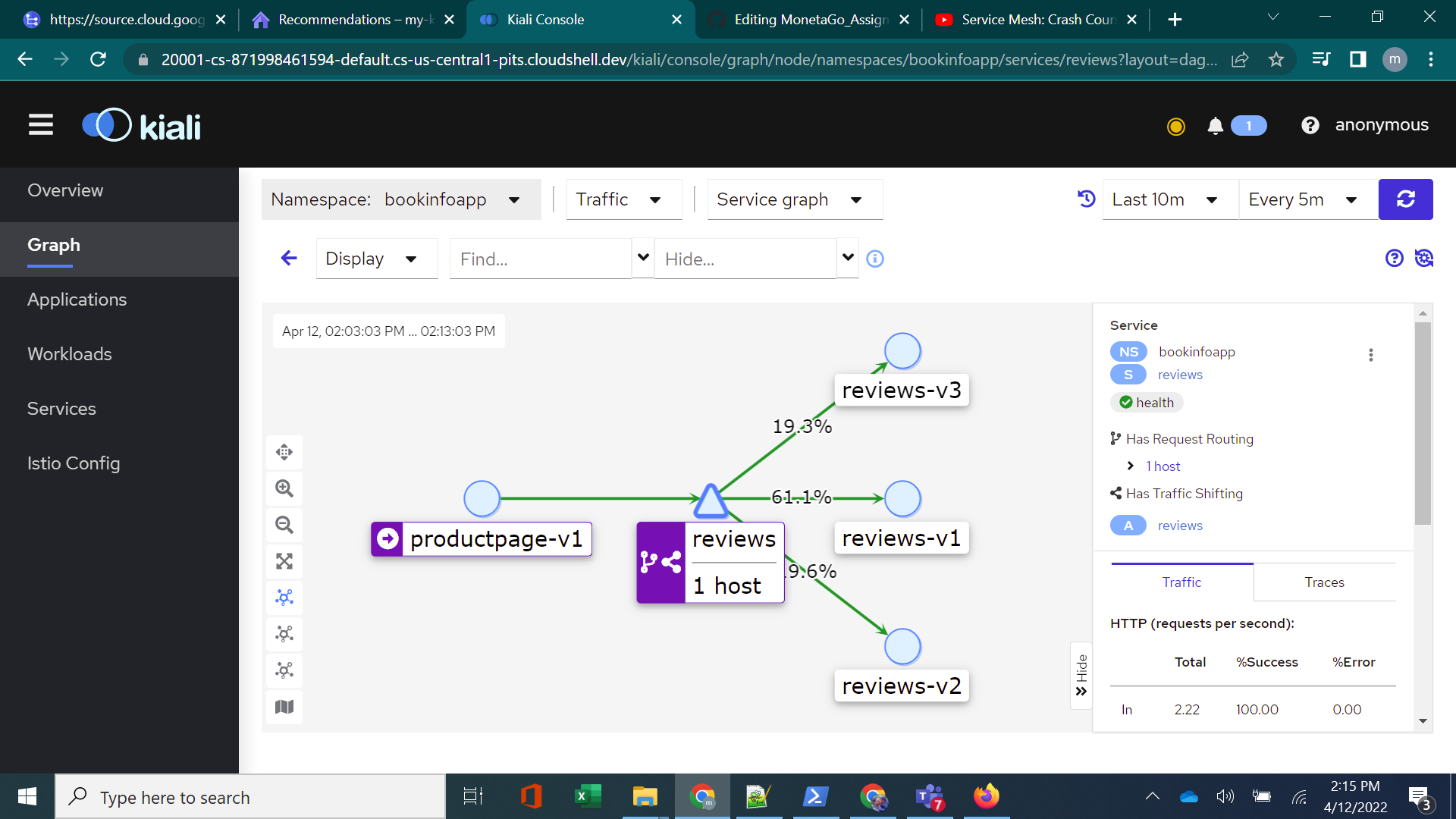
- run
./cleanup_deployment.shto remove bookinfo application and gateway - run
./cleanup_istio_from_cluster.shto remove all addons and istio from cluster - navigate to terraform-file\examples\gke-private-cluster and run
terraform destroyto delete the cluster.
- The master_authorized_networks_config is currently allowed from all ips "0.0.0.0/0" for easier testing. Private cluster should allow only projects vpc to connect to cluster. It can be achieved by creating a vm as bastion host in authorized network
- Service account for cluster has project editor role, which is too permissive. I kept it for easier testing. It can be improved further to restrict to specific needs.
- ./setup_Istio.sh installs Istio but does not check status of
curloristioctl install -y - ./deploy_bookinfo_with_istio_sidecar.sh does not check if all pods of bookinfo has sidecar and is in running state before exiting. It simple waits for 10s and prints results of
kubectl get pods - ./deploy_bookinfo_gateway.sh uses a gateway with hosts as *, it can be improved to use a specific hostname.