🗄️ Docs report
Description
In https://scully.io/docs/getting-started#inject-the-route-service, the TS example console.logs the array of routes from the ScullyRoutesService.available$ observable.
However, it is unclear what shape that observable takes because the example only uses <any>
links$: Observable<any> = this.scully.available$;

constructor(private scully: ScullyRoutesService) {}
When looking at the ScullyRoutesService class in scully-routes.service.d.ts, the available$ observable has a type of ScullyRoute[]
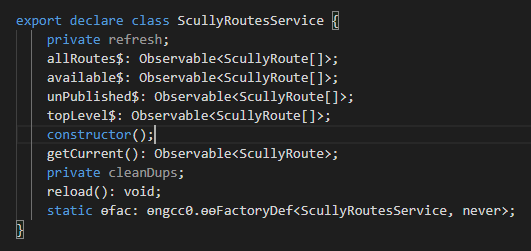
If the example of available$ is being used in the docs, and available$ has a type in the type definition file, wouldn't it make sense to include it in the docs instead / as well, like this?
links$: Observable<ScullyRoute[]> = this.scully.available$;
This could make it clearer what shapes can be expected to be extracted from available$, and maybe provide better conceptual understanding of how Scully is passing data around.
So instead of
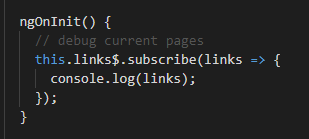
..we could see something like
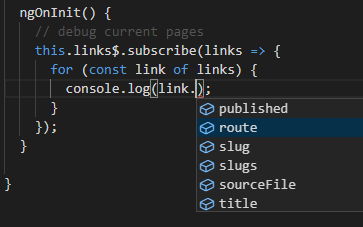
..and understand the values Scully can make available to us without having to Alt + click through the code.
Additionally, this could go alongside a simple .md example to show the structure of a @scullyio/init:post and how its shape relates to the ScullyRoutes you can pull out of ScullyRoutesService.
It could then be inferred, or simply stated how, through this structure, one can insert custom properties into the "head" of a .md file and access them in an Angular template.
Once I could "visualize" this relationship, this aspect of Scully clicked for me.
Perhaps it's a simple enough example to partially include in the "Getting Started" docs page, or as an addition to the "Blogs in Scully" page, helping paint these shapes and relationships to new users, so when they see
<li *ngFor="let page of links$ | async">{{ page.route }}</li>..they may have a better idea of what page means, what is included in it, and how they can add to it themselves.
If my understanding is correct, I'd be happy to submit a PR for this if it could be useful.
🔬 Minimal Reproduction
What's the affected URL?**
Reproduction Steps**
Expected vs Actual Behavior**
📷Screenshot
🔥 Exception or Error
🌍 Your Environment
Browser info
Anything else relevant?

🗄️ Docs report
Description
In https://scully.io/docs/getting-started#inject-the-route-service, the
TSexample console.logs the array of routes from theScullyRoutesService.available$observable.However, it is unclear what shape that observable takes because the example only uses
<any>When looking at the
ScullyRoutesServiceclass inscully-routes.service.d.ts, theavailable$observable has a type ofScullyRoute[]If the example of
available$is being used in the docs, andavailable$has a type in the type definition file, wouldn't it make sense to include it in the docs instead / as well, like this?This could make it clearer what shapes can be expected to be extracted from
available$, and maybe provide better conceptual understanding of how Scully is passing data around.So instead of

..we could see something like

..and understand the values Scully can make available to us without having to
Alt + clickthrough the code.Additionally, this could go alongside a simple
.mdexample to show the structure of a@scullyio/init:postand how its shape relates to theScullyRoutes you can pull out ofScullyRoutesService.It could then be inferred, or simply stated how, through this structure, one can insert custom properties into the "head" of a
.mdfile and access them in an Angular template.Once I could "visualize" this relationship, this aspect of Scully clicked for me.
Perhaps it's a simple enough example to partially include in the "Getting Started" docs page, or as an addition to the "Blogs in Scully" page, helping paint these shapes and relationships to new users, so when they see
..they may have a better idea of what
pagemeans, what is included in it, and how they can add to it themselves.If my understanding is correct, I'd be happy to submit a PR for this if it could be useful.
🔬 Minimal Reproduction
What's the affected URL?**
Reproduction Steps**
Expected vs Actual Behavior**
📷Screenshot
🔥 Exception or Error
🌍 Your Environment
Browser info
Anything else relevant?